
CompTIA A+ Practice Test: The Complete 2026 Study Guide
What Is a CompTIA A+ Practice Test?
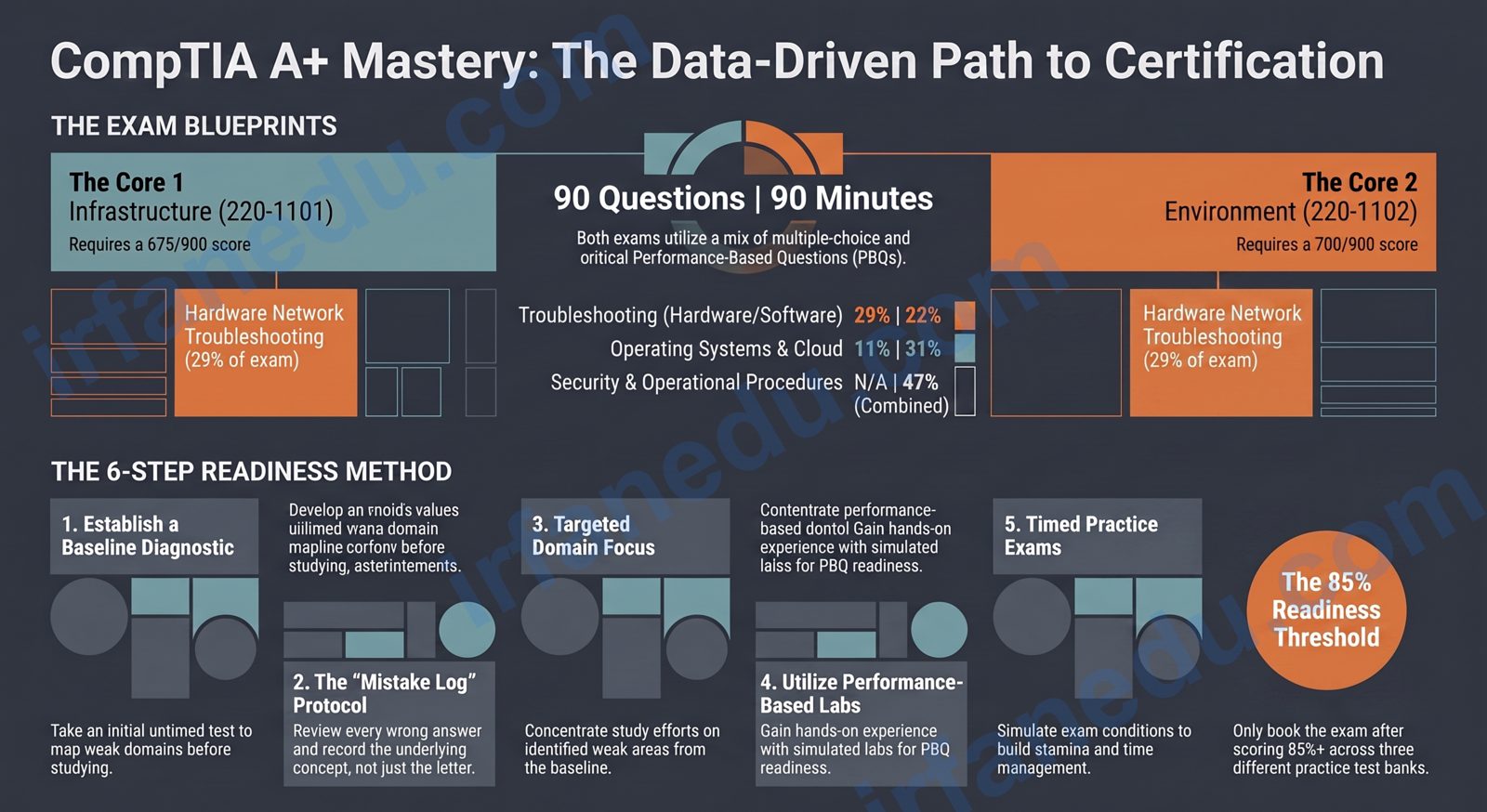
A CompTIA A+ practice test is a timed simulation of the real CompTIA A+ certification exams — Core 1 (exam code 220-1101) and Core 2 (exam code 220-1102). Each practice exam mirrors the real format: up to 90 questions, a 90-minute timer, and a mix of multiple-choice, drag-and-drop, and performance-based questions (PBQs).
The CompTIA A+ is the world’s most widely recognized entry-level IT certification. It validates that you can support hardware, software, networking, and security across a range of devices and operating systems. Practice tests are the single most efficient tool for exam readiness — but only when you use them the right way.
In my experience coaching IT certification candidates, the students who fail on their first attempt almost always made the same error: they used practice tests as a final check rather than a diagnostic and feedback loop. I will show you exactly how to fix that.
🎯 The Short Version
- CompTIA A+ has two separate exams: Core 1 (220-1101) and Core 2 (220-1102) — both required for certification.
- Each exam is 90 questions in 90 minutes; passing scores are 675 (Core 1) and 700 (Core 2) out of 900.
- Use practice tests as a diagnostic tool first, not just a final rehearsal.
- Target 85% or higher on at least 3 different practice banks before booking your real exam.
- Performance-based questions (PBQs) appear first — do not skip them; they carry more weight.
- Certification is valid for 3 years and renewable via CEUs or a higher CompTIA exam.
The Exam Domain Map (Visual)
Before you pick a practice test, you need to know what the exam actually tests. Below is a visual breakdown of both exams by domain and percentage weight — the same weighting CompTIA publishes in its official exam objectives.
┌─────────────────────────────────────────────────────────────────┐
│              CORE 1 — 220-1101 (90 Q / 90 min)                  │
├──────────────────────────────────────────┬──────────────────────┤
│  Domain                                  │  % of Exam           │
├──────────────────────────────────────────┼──────────────────────┤
│  1.0  Mobile Devices                     │  15%  ███░░░░░░░      │
│  2.0  Networking                         │  20%  ████░░░░░░      │
│  3.0  Hardware                           │  25%  █████░░░░░      │
│  4.0  Virtualization & Cloud Computing   │  11%  ██░░░░░░░░      │
│  5.0  Hardware & Network Troubleshooting │  29%  ██████░░░░      │
└──────────────────────────────────────────┴──────────────────────┘

┌─────────────────────────────────────────────────────────────────┐
│              CORE 2 — 220-1102 (90 Q / 90 min)                  │
├──────────────────────────────────────────┬──────────────────────┤
│  Domain                                  │  % of Exam           │
├──────────────────────────────────────────┼──────────────────────┤
│  1.0  Operating Systems                  │  31%  ██████░░░░      │
│  2.0  Security                           │  25%  █████░░░░░      │
│  3.0  Software Troubleshooting           │  22%  ████░░░░░░      │
│  4.0  Operational Procedures             │  22%  ████░░░░░░      │
└──────────────────────────────────────────┴──────────────────────┘

  KEY: Each █ ≈ 5% of exam weight
  Passing: Core 1 = 675/900 | Core 2 = 700/900
Notice that Hardware & Network Troubleshooting is the single heaviest domain on Core 1 at 29%. If your practice test scores are weak there, that one domain can cost you the exam. On Core 2, Operating Systems at 31% is the make-or-break domain for most candidates.
Core 1 vs. Core 2: What Is the Difference?
Core 1 and Core 2 test completely different skill sets. You must pass both to earn the CompTIA A+ certification. Here is a direct comparison to help you plan your study schedule.
| Feature | Core 1 (220-1101) | Core 2 (220-1102) |
|---|---|---|
| Focus Area | Hardware, networking, mobile devices, cloud basics | Operating systems, security, software troubleshooting |
| Max Questions | 90 | 90 |
| Time Limit | 90 minutes | 90 minutes |
| Passing Score | 675 / 900 | 700 / 900 |
| Heaviest Domain | Hardware & Network Troubleshooting (29%) | Operating Systems (31%) |
| PBQ Examples | Cable crimping, SOHO router setup, RAM installation | OS installation, malware removal, Active Directory tasks |
| Recommended Study Time | 4–8 weeks | 4–8 weeks |
| Exam Cost (USD) | ~$253 | ~$253 |
How to Use Practice Tests Effectively (Step-by-Step)
Taking a practice test without a strategy is like running a race without knowing the route. Here is the exact six-step method I recommend to every candidate I coach.
-
Take a Baseline Diagnostic Test (Untimed)
Before studying anything, take one full practice test with no time pressure. Do not guess randomly — give your honest best answer. Your score reveals which domains need the most work. This is your personal study roadmap. -
Study Each Weak Domain Deliberately
Use your diagnostic results to prioritize. If you scored 40% on Networking, spend your first study week there. Use CompTIA’s free official exam objectives PDF, Professor Messer’s video course, or a structured textbook — not just YouTube clips. -
Take Short Domain-Specific Quizzes (20 Questions)
After studying each domain, take a 20-question domain quiz immediately. This tests whether you understood the material or just read it. A score below 70% means you need to revisit that domain before moving on. -
Take Full Timed Practice Tests (90 Q / 90 min)
Once you have covered all domains, take full timed practice tests under real conditions: no phone, no notes, no pausing. Simulate the actual test environment as closely as possible, including sitting at a desk rather than a couch. -
Review Every Wrong Answer — Read the Explanation
This is the step most students skip. For every wrong answer, read the full explanation and identify the underlying concept. Write it in a review notebook. Do not just note the correct letter — understand why it is correct. -
Reach the 85% Threshold Across 3 Different Banks
Book your real exam only when you consistently score 85% or higher across at least 3 different practice test sources. Scoring 95% on one bank you have seen before does not mean you are ready — variety matters.
In my 15+ years helping students prepare for certification exams, the single biggest predictor of first-attempt success is not the number of hours studied — it is the quality of wrong-answer review. I have seen candidates study for 3 months and fail because they treated practice tests as score-checking exercises. The students who pass quickly are the ones who treat every wrong answer as a free lesson. Build a “mistake log” — a simple notebook or spreadsheet where you write the concept behind each wrong answer. Review it the night before your exam. That habit alone is worth more than two extra weeks of passive reading.
Your Pre-Exam Study Checklist
Use this checklist in the final two weeks before your exam date. Check each item off only when you can honestly say you have done it — not just read about it.
- Scored 85%+ on at least 3 full timed Core 1 practice tests from different sources
- Can identify and explain all common connector types (USB-A/B/C, HDMI, DisplayPort, RJ-45, RJ-11)
- Understand the OSI model layers and which protocols operate at each layer
- Can explain the difference between TCP and UDP with a real-world example
- Know RAM types (DDR4 vs DDR5), speeds, and installation rules (dual-channel)
- Understand virtualization concepts: hypervisors, VMs, containers, cloud service models (IaaS, PaaS, SaaS)
- Practiced at least 2 PBQ simulations (cable termination, SOHO router config)
- Reviewed all wrong answers in your mistake log at least twice
- Scored 85%+ on at least 3 full timed Core 2 practice tests from different sources
- Can walk through a clean Windows 10/11 installation from scratch
- Know the difference between malware types: virus, worm, ransomware, rootkit, spyware, Trojan
- Understand the CIA triad (Confidentiality, Integrity, Availability) and can apply it to scenarios
- Can explain NTFS vs FAT32 vs exFAT use cases
- Know Active Directory basics: users, groups, OUs, Group Policy
- Practiced at least 2 PBQ simulations (malware removal steps, OS troubleshooting)
- Reviewed all wrong answers in your mistake log at least twice
Common Mistakes Students Make on Practice Tests
These are the five patterns I see most often — and the fixes that actually work.
1. Memorizing Answers Instead of Understanding Concepts
If you take the same practice test three times and score 95%, you have memorized the answer key — not learned the material. The real exam uses different question phrasing for the same concept. Always rotate between at least three different practice test banks.
2. Skipping Performance-Based Questions (PBQs)
PBQs appear at the start of the real exam. Many candidates skip them to “come back later” and then run out of time. In my experience, candidates who skip PBQs and run out of time lose an average of 15–20 points they could have earned. Practice PBQs specifically — do not treat them as optional.
3. Not Simulating Real Exam Conditions
Pausing your practice test, checking your phone, or taking it in a noisy room does not prepare you for a Pearson VUE testing center. Set a 90-minute timer, sit at a desk, and do not pause. The mental fatigue of 90 uninterrupted questions is real — you need to train for it.
4. Ignoring the Explanation for Correct Answers
You got it right — but do you know why the other three options are wrong? Reading the explanations for correct answers is just as valuable as reviewing wrong ones. It deepens your understanding and helps you handle rephrased versions of the same question.
5. Booking the Exam Before Reaching the Score Threshold
Exam fees are approximately $253 per attempt. Failing and retaking costs you time and money. Do not book the real exam because you feel ready — book it when your practice test data says you are ready. There is a meaningful difference between those two things.
Most guides tell you to “take practice tests and review wrong answers.” Here is what they miss: the order in which you study domains matters more than total study hours. In my experience, candidates who study domains in reverse order of their baseline diagnostic score — weakest domain first — consistently outperform those who study in the order the textbook presents them. Your weakest domain compounds: a poor understanding of networking on Core 1 will hurt your troubleshooting score too, because 29% of Core 1 troubleshooting questions involve network scenarios. Fix your floor first, not your ceiling.
🧠 Quick Knowledge Check
Test yourself on three real exam-style concepts. Select an answer to see instant feedback.
Q1. A technician needs to connect a laptop to a projector using the highest-quality video signal available. The laptop has USB-C (Thunderbolt 3), HDMI 2.0, and VGA ports. The projector supports HDMI and VGA. Which connection should the technician use?
Q2. Which of the following BEST describes the purpose of a UEFI Secure Boot setting?
Q3. A user reports that their Windows 10 PC shows a “BOOTMGR is missing” error on startup. Which tool should the technician use FIRST to attempt a repair?
Reveal-on-Click Practice Problems
These are scenario-style questions similar to what you will see on the real exam. Think through your answer, then click to reveal the explanation.
Problem 1: A customer’s laptop battery drains in 2 hours but the manufacturer specs say 8 hours. What are the three most likely causes to investigate first?
powercfg /batteryreport in Command Prompt) to check design capacity vs full charge capacity. (2) High-drain background processes — check Task Manager for CPU/GPU-intensive apps running in the background. (3) Display brightness and power plan — a screen at 100% brightness on “High Performance” mode can cut battery life by 50%+. Start with the battery report; it gives you the data to make an informed diagnosis rather than guessing.
Problem 2: A technician is setting up a SOHO wireless network. The owner wants to ensure that only specific devices can connect. Which feature should the technician enable?
Problem 3: A Windows 11 PC cannot connect to any websites but can ping 8.8.8.8 successfully. What is the most likely cause?
Frequently Asked Questions
How many questions are on the CompTIA A+ exam?
Sources & References
Written and fact-checked by Dr Irfan Mansuri. External links open in a new tab and are provided for further reading and verification.