Career Development Guide
How to Create a Professional Resume: Top 5 Tips
A professional resume helps employers understand your qualifications, experience, skills, and suitability for a job. Whether you are a student, fresher, or experienced professional, a well-structured resume can help you make a stronger first impression.
You do not need a complicated design or expensive software to create an effective resume. Focus on clarity, relevant achievements, appropriate keywords, and consistent formatting. Here are five practical tips to help you get started.
Tip 1
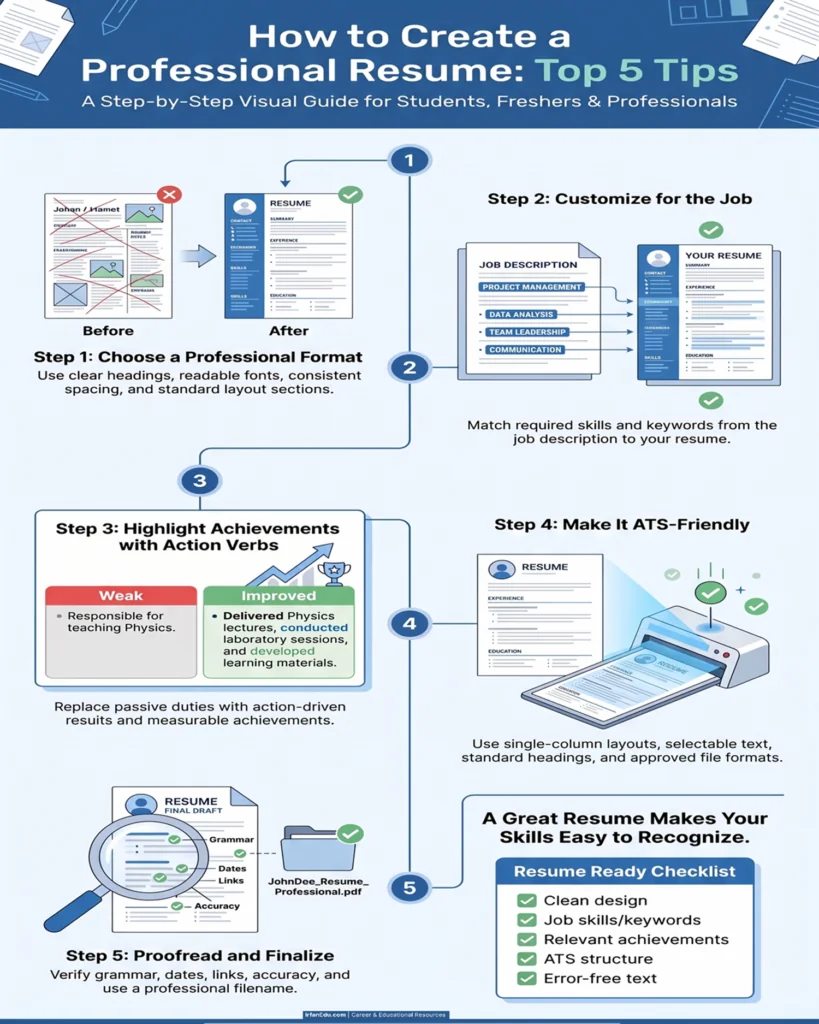
Choose a Clean and Professional Resume Format
Your resume should be easy to scan in a few seconds. Use a simple layout, readable typography, clear section headings, and sufficient white space. Avoid excessive colors, decorative graphics, and complicated layouts that distract from your qualifications.
What should your resume include?
- Contact information: Your name, professional email address, phone number, and relevant location.
- Professional summary: A short introduction highlighting your background and strengths.
- Work experience: Relevant positions, responsibilities, and measurable achievements.
- Education: Degrees, institutions, and relevant qualifications.
- Skills: Technical skills and job-relevant professional abilities.
- Additional sections: Projects, certifications, publications, or awards when relevant.
Use one or two readable fonts, such as Arial or Calibri, and maintain consistent heading sizes. A one-page resume can work well for many students and freshers, while experienced candidates may need two pages or more when the additional information is relevant.
Tip 2
Customize Your Resume for Every Job Application
Sending the same resume for every position may make it harder for employers to identify your most relevant qualifications. Read the job description carefully and emphasize the experience, skills, and accomplishments that match the advertised role.
How to tailor your resume
- Identify the essential skills and qualifications in the job description.
- Highlight your matching experience and relevant projects.
- Use accurate industry terminology where it describes your actual knowledge and work.
- Reorder relevant skills and achievements so the strongest evidence is easy to find.
Highlight teaching experience, laboratory instruction, curriculum development, assessment, research, and relevant publications, according to the job requirements.
For a software role, emphasize programming languages, projects, technical tools, and demonstrated problem-solving ability instead.
Tip 3
Highlight Achievements Instead of Listing Only Duties
Employers want to understand not only what you were responsible for, but also what you accomplished. Whenever possible, support your experience with specific outcomes, numbers, or examples. Only include figures you can substantiate.
Weak versus stronger resume statements
Responsible for teaching Physics to engineering students.
Delivered Engineering Physics lectures, conducted laboratory sessions, developed learning materials, and assessed student performance.
This example describes specific contributions. Add verified outcomes, such as class size or improved results, when available.
Use the action + task + result approach
Start with a strong action verb, explain the work you completed, and add the outcome when you have reliable evidence.
Action: Developed
Task: Interactive learning materials for a university course
Result: Include a verified improvement in engagement or performance, if measured.
Students and freshers can demonstrate their abilities through academic projects, internships, laboratory work, volunteering, competitions, and relevant coursework.
Tip 4
Make Your Resume ATS-Friendly
Many employers use applicant tracking systems (ATS) to collect, organize, or screen applications. A straightforward resume structure can make your information easier for software and recruiters to interpret.
ATS optimization best practices
- Use conventional headings such as Experience, Education, Skills, and Certifications.
- Include relevant keywords from the job description naturally and accurately.
- Prefer a simple, single-column layout for broad compatibility.
- Avoid putting essential contact details only in headers, footers, icons, or images.
- Use selectable text rather than a scanned image of your resume.
- Follow the employer’s requested file format. Use PDF when accepted, or DOCX when requested.
- Check the final document by selecting and copying its text into a plain-text editor.
No formatting choice guarantees that a resume will pass every ATS. Employers use different systems and screening criteria. Prioritize accurate information, readable structure, and a clear match with the job requirements.
Tip 5
Proofread Your Resume and Keep It Concise
Spelling mistakes, inconsistent dates, broken links, and outdated contact information can weaken an otherwise strong application. Review the entire document before sending it.
Final editing tips
- Use short bullet points rather than long paragraphs.
- Keep verb tense consistent: past tense for completed roles and present tense for ongoing responsibilities.
- Remove repetitive information and unrelated personal details.
- Check spelling, grammar, dates, job titles, and contact details.
- Use a professional email address and working portfolio or LinkedIn links where relevant.
- Ensure that your resume accurately represents your qualifications and experience.
- Save a final copy with a clear filename, such as FirstName-LastName-Resume.pdf.
Ask a trusted colleague, teacher, or mentor to review the resume. A second reader may spot unclear wording or mistakes you missed.
Professional Resume: Final Checklist
Review these points before submitting your application.
- My contact information is correct and up to date.
- My resume is tailored to the position.
- My most relevant skills appear clearly.
- My achievements are accurate and supported by evidence.
- My education, experience, and dates are consistent.
- The document uses readable fonts and clear headings.
- The file format follows the employer’s instructions.
- I have checked spelling, grammar, and document links.
Conclusion
Creating a professional resume is about presenting your qualifications in a clear, relevant, and credible way. Choose a clean design, tailor the content to each opportunity, demonstrate your achievements, use an ATS-friendly structure, and proofread carefully.
Whether you are applying for your first job, a teaching position, an engineering role, or a career change, these five principles can help you communicate your value more effectively.
Frequently Asked Questions (FAQs)
1. How do I create a professional resume for free?
You can create a resume using a word processor such as Microsoft Word or Google Docs. Choose a simple template, organize your education and experience, add relevant skills, and export the finished document in the format requested by the employer.
2. How long should a professional resume be?
One page is often suitable for students and early-career candidates. Experienced professionals may need two pages or more if their relevant achievements, qualifications, and experience justify the additional length.
3. Should I use a PDF or Word document for my resume?
Follow the employer’s instructions first. PDF generally preserves visual formatting, while DOCX may be preferred by some application systems. Both formats can work when the document is properly structured.
4. What is an ATS-friendly resume?
An ATS-friendly resume uses readable text, conventional section headings, relevant job keywords, and a straightforward layout that helps applicant tracking systems process information. No single format works perfectly with every system.
5. What should freshers include in a resume?
Freshers should emphasize education, relevant coursework, academic projects, internships, technical skills, certifications, volunteering, and other genuine evidence of their abilities. They do not need to invent work experience to create a credible resume.
6. Is it acceptable to use AI to write a resume?
AI can help organize information, improve wording, and check grammar. Review every suggestion carefully, verify all facts, protect personal information, and ensure the final resume accurately reflects your own experience.