AI Productivity Guide
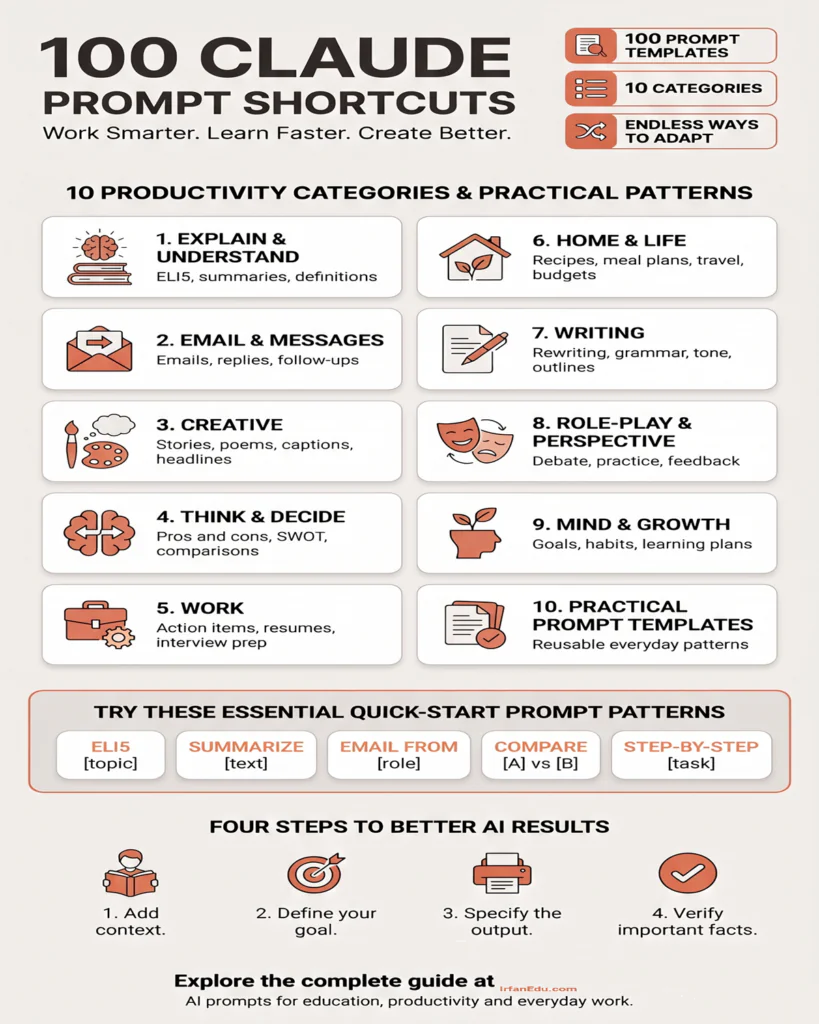
100 Claude Prompt Shortcuts for Work, Study and Daily Life
A practical collection of reusable prompt patterns to help you explain difficult topics, write better, plan work, make decisions and organize everyday tasks with Claude AI.
Good AI results start with clear instructions. Instead of writing every request from scratch, reuse a prompt pattern and replace its placeholders with your own details. This guide organizes 100 Claude prompt shortcuts into ten categories, with examples for school, college, teaching, research, office work and personal projects.
These are prompt templates, not official Claude keyboard shortcuts or guaranteed commands. Results depend on the context you provide, the model and the tools available in your account.
[topic] or [paste text], with your own information. Add your audience, constraints and desired output format when relevant.How to get better results from Claude
- Give context: explain who the answer is for and what you want to achieve.
- Specify the output: ask for a checklist, table, email, lesson outline or step-by-step guide.
- Add constraints: mention tone, length, level, format, budget or deadline.
- Iterate: ask Claude to revise the result, identify assumptions or explain missing information.
- Verify important details: check factual claims, calculations, references and advice before relying on them.
For students
Ask for simpler explanations, worked examples, practice questions and feedback—not just a final answer.
For teachers
Specify class level, learning outcomes, syllabus, difficulty and assessment format.
For professionals
Provide source material, define the audience and request action-oriented outputs.
CATEGORY 01
Explain & Understand
Explain & Understand prompt templates to help you get a more useful first draft.
ELI5
Use with: [topic]
Explain [topic] as if I were five, using simple words and an everyday example.
TLDR
Use with: [text]
Summarize [text] in a few sentences, keeping only essential information.
SUMMARIZE
Use with: [text]
Summarize [text], including the main argument and supporting points.
KEY POINTS
Use with: [text]
Extract the 5–7 most important points from [text] as bullets.
MAIN IDEAS
Use with: [text]
Identify the central ideas, supporting details and conclusion in [text].
DEFINE
Use with: [word]
Define [word] in plain English, then give an example and a non-example.
EXAMPLE OF
Use with: [concept]
Explain [concept] with a realistic example and show how it illustrates the idea.
ANALOGY FOR
Use with: [concept]
Explain [concept] through a familiar analogy and note its limitations.
SIMPLIFY
Use with: [text]
Rewrite [text] for a general audience without changing its meaning.
EXPAND ON
Use with: [topic]
Explain [topic] in depth, including background, key details and a practical example.
CATEGORY 02
Email & Messages
Email & Messages prompt templates to help you get a more useful first draft.
EMAIL FROM
Use with: [role] [tone]
Write an email from the perspective of [role] in a [tone] tone about [purpose].
REPLY TO
Use with: [email]
Draft a professional reply to [email], answering each question and preserving facts.
SUBJECT LINE FOR
Use with: [email]
Suggest 8 concise, specific subject lines for [email].
FOLLOW-UP EMAIL ABOUT
Use with: [topic]
Write a polite follow-up about [topic] without sounding pushy.
POLITE DECLINE
Use with: [situation]
Decline [request] respectfully, with a brief reason and alternative if appropriate.
APOLOGY FOR
Use with: [situation]
Write a sincere apology for [situation], acknowledge the impact and explain corrective action.
THANK YOU NOTE TO
Use with: [person]
Write a warm, concise thank-you message to [person] for [reason].
CONDOLENCE MESSAGE FOR
Use with: [situation]
Write a compassionate, brief condolence message. Avoid clichés.
CONGRATULATIONS MESSAGE FOR
Use with: [achievement]
Write a genuine congratulations message for [achievement], matching the relationship.
MEETING AGENDA FOR
Use with: [topic]
Create an agenda for [topic] with objectives, discussion items, time estimates and actions.
CATEGORY 03
Creative
Creative prompt templates to help you get a more useful first draft.
STORY ABOUT
Use with: [prompt]
Write an original short story based on [prompt], with a clear beginning, conflict and ending.
POEM ABOUT
Use with: [topic]
Write an original poem about [topic] in a [style/mood] tone.
HAIKU ABOUT
Use with: [topic]
Write three original haiku about [topic], aiming for the 5–7–5 syllable pattern.
JOKE ABOUT
Use with: [topic]
Write a clean, light-hearted joke about [topic] for a general audience.
CAPTION FOR
Use with: [photo]
Write 5 concise, accessible captions for a photo showing [description].
TWEET ABOUT
Use with: [topic]
Draft a clear social post about [topic] within the platform’s current character limit.
ATTENTION POST ABOUT
Use with: [topic]
Write an engaging social post with a useful opening, concrete value and natural call to action.
INSTAGRAM CAPTION FOR
Use with: [description]
Write an Instagram caption with a strong first line and relevant hashtags.
HEADLINE FOR
Use with: [topic]
Suggest 10 accurate, compelling headlines for [topic], avoiding misleading clickbait.
NAME IDEAS FOR
Use with: [thing]
Generate 20 distinctive names for [thing], grouped by style; remind me to check trademarks.
CATEGORY 04
Think & Decide
Think & Decide prompt templates to help you get a more useful first draft.
PROS AND CONS
Use with: [topic]
List benefits, drawbacks, risks and uncertainties of [topic].
COMPARE
Use with: [A] vs [B]
Compare [A] and [B] by cost, effort, benefits, limitations and best-fit situations.
SWOT OF
Use with: [topic]
Create a SWOT analysis of [topic], separating internal and external factors.
RISK OF
Use with: [plan]
Identify risks in [plan], estimate likelihood and impact, and suggest mitigations.
RECOMMENDATION FOR
Use with: [situation]
Recommend an option for [situation], stating assumptions, trade-offs and what could change the recommendation.
BEST OPTION FOR
Use with: [goal]
Rank options for [goal] against my priorities: [priorities]. Explain the ranking.
DECISION MATRIX
Use with: [options, criteria]
Build a weighted decision matrix for [options] using [criteria], showing weights and scores.
STEP-BY-STEP
Use with: [task]
Break [task] into steps, prerequisites, likely mistakes and a way to verify completion.
PRIORITIZE
Use with: [tasks]
Prioritize [tasks] by urgency, impact, effort and dependencies; explain the order.
WOULD YOU RATHER
Use with: [choices]
Help compare [choice A] and [choice B] by asking key clarifying questions first.
CATEGORY 05
Work
Work prompt templates to help you get a more useful first draft.
ACTION ITEMS FOR
Use with: [topic]
Extract action items from [notes], including stated owner, deadline and unresolved questions.
ACTION ITEMS FROM
Use with: [notes]
Convert [notes] into a checklist of specific, verifiable actions.
EXEC SUMMARY OF
Use with: [text]
Write an executive summary of [text] with purpose, findings, implications and next steps.
COVER LETTER FOR
Use with: [job description]
Draft a tailored cover letter using my real experience; do not invent achievements.
RESUME BULLET FOR
Use with: [achievement]
Turn this real achievement into a concise results-focused resume bullet; do not invent metrics.
AGENDA FOR
Use with: [meeting]
Create an agenda for [meeting] with outcomes, time boxes and preparation required.
INTERVIEW QUESTIONS FOR
Use with: [role]
Generate likely interview questions for [role], grouped by technical, behavioral and situational themes.
ANSWERS TO INTERVIEW QUESTION
Use with: [question]
Help structure an honest answer to [question] using my real experience: [details].
PERFORMANCE REVIEW PHRASES FOR
Use with: [trait]
Suggest respectful review wording for [trait], with observable examples and development steps.
PITCH DECK OUTLINE FOR
Use with: [idea]
Outline a pitch deck for [idea], slide by slide, with audience takeaway and evidence needed.
CATEGORY 06
Home & Life
Home & Life prompt templates to help you get a more useful first draft.
RECIPE FOR
Use with: [dish]
Give a recipe for [dish] with quantities, numbered steps, timing and substitutions.
SUBSTITUTE FOR
Use with: [ingredient]
Suggest substitutes for [ingredient] in [recipe], explaining quantities and texture changes.
SHOPPING LIST FOR
Use with: [recipe/week]
Create a categorized shopping list for [recipe/meal plan] and combine duplicate ingredients.
MEAL PLAN FOR
Use with: [goal, days]
Create a [number]-day meal plan for [goal], considering preferences, budget and dietary constraints.
WORKOUT FOR
Use with: [goal]
Suggest a beginner-friendly workout based on my equipment and experience, with safe modifications.
PACKING LIST FOR
Use with: [trip, days]
Make a packing checklist for a [trip type] lasting [number] days, considering weather and essentials.
TRAVEL ITINERARY FOR
Use with: [place, days]
Draft a realistic itinerary for [place], grouping nearby attractions and flagging details to verify.
GIFT IDEAS FOR
Use with: [person, budget]
Suggest thoughtful gifts for [person] within [budget], based on [interests].
BUDGET PLAN FOR
Use with: [income, goal]
Create a budget using my stated income, costs and savings goal: [details].
DECLUTTER PLAN FOR
Use with: [room]
Create a manageable decluttering plan for [room], split into short sessions.
CATEGORY 07
Writing
Writing prompt templates to help you get a more useful first draft.
REWRITE
Use with: [text]
Rewrite [text] for clarity and flow while preserving meaning and facts.
IMPROVE
Use with: [text]
Improve the structure and readability of [text], then explain the main changes.
SHORTEN
Use with: [text]
Shorten [text] by about [percentage] while preserving essential information.
EXPAND
Use with: [text]
Expand [text] with useful explanations and examples; do not add unsupported facts.
GRAMMAR CHECK
Use with: [text]
Correct grammar, spelling and punctuation in [text] while keeping my voice.
TONE
Use with: [text]
Rewrite [text] in a [professional/friendly/formal/empathetic] tone for [audience].
HOOK FOR
Use with: [topic]
Write 5 specific opening hooks for [topic] without exaggeration.
OUTLINE FOR
Use with: [topic]
Create a logical outline for [topic] and [audience], explaining each section’s purpose.
BLOG INTRO FOR
Use with: [topic]
Write an article introduction that states the reader’s problem and what they will learn.
CONCLUSION FOR
Use with: [topic]
Write a concise conclusion summarizing the key message and suggesting a next step.
CATEGORY 08
Role-Play & Perspective
Role-Play & Perspective prompt templates to help you get a more useful first draft.
ACT AS
Use with: [role]
Act as a [role] for practice. Ask one question at a time and distinguish role-play from factual advice.
MULTIPLE PERSPECTIVES ON
Use with: [topic]
Explain [topic] from [number] reasonable viewpoints and identify their assumptions.
WHAT WOULD [ROLE] DO?
Use with: [situation]
Describe how a [role] might approach [situation], noting that real people may differ.
DEBATE ON
Use with: [topic]
Present strong good-faith arguments for and against [topic], then identify common ground.
ADVICE FROM
Use with: [role]
Give general advice from a [role] perspective, flagging when expert help is needed.
NEGOTIATION ROLE-PLAY
Use with: [situation]
Role-play a negotiation about [situation], letting me respond between turns and giving feedback.
CUSTOMER SUPPORT REPLY TO
Use with: [query]
Draft a courteous support reply to [query], giving only verified next steps.
SALES PITCH TO
Use with: [audience]
Create an ethical pitch for [product/service] based on verified benefits and limitations.
FEEDBACK AS
Use with: [role]
Review my work as a [role], with specific strengths, improvements and actionable examples.
MOTIVATE ME AS
Use with: [coach]
Offer practical encouragement in a supportive [coach/mentor] style, with one small next action.
CATEGORY 09
Mind & Growth
Mind & Growth prompt templates to help you get a more useful first draft.
CLARIFY MY GOAL
Use with: [goal]
Turn [goal] into a specific outcome with deadline, success measure and realistic first step.
HABIT PLAN FOR
Use with: [goal]
Design a habit plan with a cue, easy starting action, tracking method and recovery plan.
MORNING ROUTINE FOR
Use with: [goal]
Suggest a realistic morning routine that fits [available time] and my constraints.
PRODUCTIVITY TIPS FOR
Use with: [task]
Suggest ways to focus on [task], reduce distractions and measure progress.
LEARN [SKILL] IN 30 DAYS
Use with: [skill]
Create a 30-day plan for [skill] with weekly milestones, daily practice and progress checks.
BOOK RECOMMENDATIONS FOR
Use with: [topic]
Recommend books about [topic] for [level], explaining why each fits and asking me to verify availability.
AFFIRMATIONS FOR
Use with: [theme]
Write realistic affirmations that encourage effort without promising guaranteed outcomes.
REFLECTION QUESTIONS FOR
Use with: [topic]
Give 10 thoughtful questions about [topic], moving from observation to possible action.
LIFE PLAN FOR
Use with: [years]
Draft a flexible [time period]-year plan across work, learning, relationships, finances and wellbeing.
CONVERSATION STARTERS FOR
Use with: [setting]
Suggest natural conversation starters for [setting], avoiding intrusive personal questions.
CATEGORY 10
AI & Learning
Prompt templates for teaching, revision, practice and research planning.
LESSON PLAN FOR
Use with: [topic, level]
Create a lesson plan for [topic] and [level] with objectives, activities, checks for understanding and timing.
QUIZ ME ON
Use with: [topic]
Quiz me on [topic] one question at a time and explain each answer after I respond.
FLASHCARDS FOR
Use with: [topic]
Create question-and-answer flashcards for [topic], grouped from basic to advanced.
EXPLAIN A FORMULA
Use with: [formula]
Explain [formula] symbol by symbol, state its assumptions and work through a simple example.
PRACTICE PROBLEMS FOR
Use with: [topic]
Create five practice problems on [topic] with varied difficulty and solutions in a separate section.
LEARNING OBJECTIVES FOR
Use with: [unit]
Write measurable learning objectives for [unit] using observable action verbs.
RUBRIC FOR
Use with: [assignment]
Create an assessment rubric for [assignment] with clear criteria and performance levels.
RESEARCH QUESTION IDEAS FOR
Use with: [field]
Suggest focused research questions in [field], explain feasibility and identify what needs a literature review.
CHECK MY UNDERSTANDING OF
Use with: [concept]
Ask diagnostic questions about [concept] to identify gaps in my understanding before explaining them.
STUDY PLAN FOR
Use with: [exam, date]
Build a revision plan for [exam] by [date], balancing topics, practice and spaced review.
Use AI responsibly
Best practices for using Claude prompts
- Protect private information. Avoid pasting confidential student records, passwords or sensitive personal data unless you understand the applicable data settings.
- Check sources. Open and verify sources yourself. Do not assume a citation exists just because AI generated it.
- Keep your own voice. Treat AI drafts as a starting point and review the final work for accuracy, originality and tone.
- Follow academic and workplace rules. Disclose AI assistance where required and follow your institution’s policies.
- Use expert judgement for high-stakes decisions. AI output is not a substitute for qualified medical, legal, financial or safety advice.
Quick answers
Frequently asked questions
What are Claude prompt shortcuts?
They are reusable prompt patterns with placeholders that help you give Claude clear instructions for common tasks.
How do I use a Claude prompt shortcut?
Replace bracketed placeholders with your topic, text, role, audience, goal or constraints. Add context and specify the output format.
Are these prompts guaranteed to produce correct answers?
No. AI responses can be incomplete or inaccurate. Independently check important facts, calculations, citations and high-stakes advice.
Can I use these prompts for teaching and research?
Yes. They can help with explanations, lesson outlines, summaries and question generation. Verify references and never assume generated citations are real.
Do I need to install anything?
No special installation is needed. Open Claude in a browser or supported app and adapt a prompt. Feature availability can vary by account and region.
Last reviewed: October 26, 2026. AI products and features may change. Check official Claude documentation for current capabilities and terms. This guide is educational and does not imply endorsement by or affiliation with Anthropic.