Your AI Stack, Explained Like a Human Body
Before you build an AI agent, understand what each component does. Learn how LLMs, RAG, MCP, Skills and AI Agents work together—and how to choose the right solution for your problem.
Introduction: Build the Right AI System, Not Just an Agent
Sometimes the best way to build an AI agent is to start creating one. But before you do, identify which part of the system is actually missing.
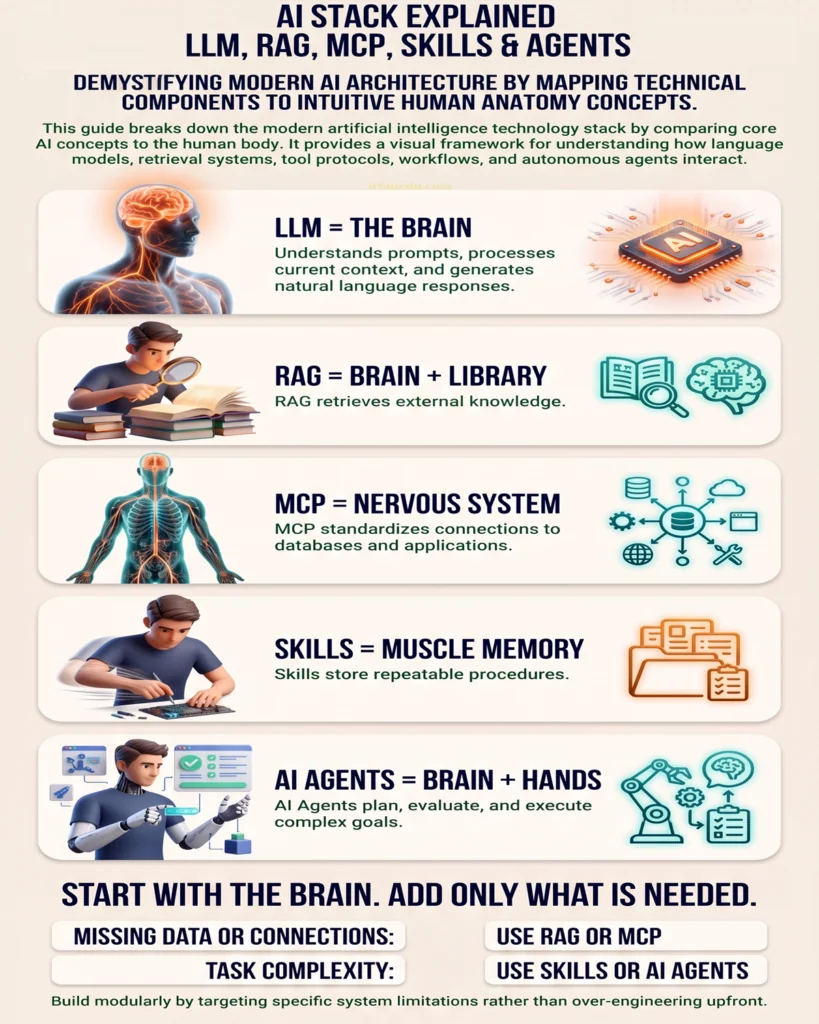
Think of an AI system as a human body. The brain processes information, a library supplies additional knowledge, the nervous system connects different parts, muscle memory helps perform familiar tasks, and hands turn decisions into actions.
In a modern AI application, these roles can be represented by five useful concepts: the Large Language Model (LLM), Retrieval-Augmented Generation (RAG), Model Context Protocol (MCP), Skills, and the AI Agent.
The AI Stack at a Glance
- LLM = The Brain: Understands prompts and generates responses.
- RAG = Brain + Library: Retrieves relevant information from external knowledge sources.
- MCP = The Nervous System: Provides a standard way to connect compatible AI applications with tools and data.
- Skills = Muscle Memory: Packages reusable instructions and procedures for particular tasks.
- AI Agent = Brain + Hands: Coordinates steps and uses tools to pursue a goal.
These are conceptual analogies, not strict technical definitions. In a real application, the components can overlap and their implementation depends on the architecture.
1. LLM: The Brain of an AI System
A Large Language Model (LLM) is the core reasoning and language component in many AI applications. It processes input, recognises patterns learned during training, and generates text, code, explanations or other supported outputs.
An LLM can help answer questions, summarise documents, analyse information, write content and decide what response or tool call may be appropriate.
What an LLM Can Do
- Understand and respond to natural-language instructions.
- Generate text, explanations, summaries and code.
- Reason through many types of problems, with varying reliability.
- Interpret information supplied in the current conversation or context.
What an LLM Cannot Reliably Do Alone
A model does not automatically know your organisation’s private policies, current database records or the latest information. Its answers can also be incorrect. Access to external information, tools and verification may be necessary.
2. RAG: The Brain with a Library
Retrieval-Augmented Generation (RAG) connects an LLM to external knowledge sources. Before generating an answer, the application retrieves relevant information from documents, knowledge bases or other indexed sources and supplies it to the model.
This allows an AI application to use information that was not included in the model’s original training data.
How RAG Works
- Prepare the knowledge: Documents are processed and indexed for retrieval.
- Receive a question: A user asks something about the available information.
- Retrieve relevant content: The system searches for useful passages or records.
- Generate an answer: The LLM uses the retrieved context to formulate a response.
When Should You Use RAG?
- When answers must reflect internal policies or company documentation.
- When users need to ask questions about PDFs, manuals or reports.
- When a knowledge base changes more frequently than model training.
- When responses should be grounded in retrievable source material.
Remember: RAG can improve grounding, but it does not guarantee correctness. Retrieval quality, document freshness and answer verification still matter.
3. MCP: The Nervous System Connecting Tools and Data
The Model Context Protocol (MCP) is an open protocol designed to provide a standard way for compatible AI applications to connect with external tools, resources and data sources.
Think of MCP as a common connection layer. Rather than building a completely different integration pattern for every compatible application and tool, developers can use a standard protocol to expose supported capabilities.
What MCP Can Connect
- Tools that perform supported operations.
- Resources containing useful information or data.
- Compatible applications and services through MCP servers.
- Development environments and workflows that support MCP.
Example: Connecting an AI Assistant to a CRM
Suppose a sales team wants an AI assistant to look up customer records. An MCP server could expose an authorised CRM lookup tool. A compatible AI application could discover and invoke that tool, subject to the permissions and safeguards configured by the system.
MCP itself is not the LLM, the agent’s planning logic or a guarantee of access. The underlying service must still implement the required integration and enforce authentication and permissions.
4. Skills: The Muscle Memory of AI
Skills are reusable packages of instructions, procedures and supporting resources that help an AI system perform a particular type of task consistently.
Depending on the framework, a skill may contain instructions, examples, reference documents or scripts. Some systems load the relevant skill only when it is needed, helping keep the initial context focused.
Why Skills Matter
- Make repeated tasks easier to reproduce.
- Capture a team’s preferred workflow and standards.
- Reduce the need to restate lengthy instructions every time.
- Support task-specific procedures and quality checks.
Example: A Blog Publishing Skill
A content team could define a reusable skill with instructions to draft an article, follow editorial guidelines, check headings, prepare metadata and produce a final publishing checklist.
When a suitable task begins, an AI system that supports this pattern can use the skill’s instructions as part of its workflow.
Skills are not a single universal standard across all AI frameworks. Their exact structure, loading behaviour and execution capabilities depend on the implementation.
5. AI Agents: The Brain with Hands
An AI agent goes beyond producing a single response. It can work toward a goal by selecting actions, using tools, evaluating results and deciding what to do next, within its configured permissions and operating boundaries.
In this analogy, the LLM provides much of the language and decision-making capability, while tools provide the ability to interact with external systems. The agent’s orchestration logic coordinates the workflow.
What an AI Agent Can Do
- Break a goal into smaller steps.
- Choose from available tools when appropriate.
- Retrieve information from connected systems.
- Use results from one step to guide the next.
- Report progress, request clarification or escalate when necessary.
Example: A Customer Support Agent
A customer support agent might retrieve a customer’s order, check a delivery status, compare the result with the company’s policy and draft a response. If a refund or other sensitive action requires approval, the workflow should request authorisation rather than act beyond its permissions.
6. How the Five Components Work Together
Consider an AI assistant that helps employees answer policy questions and complete approved HR workflows.
- LLM: Interprets the employee’s request and generates language.
- RAG: Retrieves the relevant policy and supporting information.
- MCP or another integration: Provides access to compatible HR tools and data, where configured.
- Skill: Supplies the approved procedure for handling a particular request.
- Agent orchestration: Coordinates the steps, evaluates results and requests human approval when needed.
Not every application needs all five components. A simple question-answering tool may need only an LLM. A document assistant may benefit from RAG without autonomous tool use. An agent may use direct APIs instead of MCP and may not require a separate skill system.
7. Which AI Component Is Your Team Missing?
Before building a more complex system, identify the actual limitation.
| Problem | Potential Solution | Why |
|---|---|---|
| The AI does not know our policies. | RAG or another knowledge-retrieval approach | Provides access to relevant organisational information. |
| The AI cannot reach our CRM. | An API integration, MCP or another supported connector | Enables authorised access to external systems. |
| The task is performed differently each time. | A reusable skill, workflow or structured instructions | Defines a repeatable task-specific procedure. |
| The task requires decisions across multiple steps. | Agent orchestration, if justified | Coordinates actions and adapts to intermediate results. |
| The AI gives incorrect or inconsistent answers. | Evaluation, better context, validation and appropriate safeguards | Identifies and addresses the actual source of unreliability. |
The solution should follow the problem. Adding more components without a clear need can increase complexity, cost, maintenance requirements and risk.
8. Why You Should Not Build an Agent for Every Task
Autonomous agents can be useful, but they are not always the best architecture. Some tasks are simpler and more reliable with retrieval, a conventional assistant or deterministic automation.
In a June 25, 2025 press release, Gartner predicted that more than 40% of agentic AI projects would be cancelled by the end of 2027 because of escalating costs, unclear business value or inadequate risk controls. This is an analyst forecast, not a statement that those cancellations have already occurred.
Gartner’s guidance is to pursue agentic AI where it delivers clear value, use agents when decisions are needed, automation for routine workflows and assistants for simple retrieval.
Source: Gartner — Predicts Over 40% of Agentic AI Projects Will Be Canceled by End of 2027.
A Practical Decision Framework
- Need a response? Start with an assistant or LLM.
- Need answers from your documents? Add retrieval or RAG.
- Need access to external tools? Add an appropriate integration.
- Need a repeatable procedure? Define a workflow or skill.
- Need adaptive, multi-step decisions and actions? Consider an agent with clear permissions, monitoring and human oversight.
9. Best Practices for Building an AI Stack
- Start with the business problem: Define the task and the result you need.
- Choose the simplest effective architecture: Do not introduce an agent when a fixed workflow is sufficient.
- Ground answers in reliable information: Use retrieval where external or private knowledge is required.
- Limit tool permissions: Give AI systems only the access necessary for their tasks.
- Require approval for sensitive actions: Apply suitable controls to financial, customer and administrative operations.
- Test and measure performance: Evaluate accuracy, reliability, latency, cost and failure recovery.
- Monitor after deployment: Review errors, access logs and changing business requirements.
10. Frequently Asked Questions
What is the difference between an LLM and an AI agent?
An LLM generates and interprets content. An AI agent uses a model within a system that can coordinate steps and invoke tools to pursue a goal. Not every LLM application is an agent.
Is RAG required to build an AI agent?
No. RAG is useful when an application needs to retrieve information from external knowledge sources. An agent can operate without RAG if its task does not require that capability.
What is MCP in simple terms?
MCP is an open protocol that standardises how compatible AI applications connect to external tools and data resources. It does not independently provide permissions or guarantee access to a service.
Are AI Skills the same as model training?
No. Skills generally provide reusable instructions, procedures and supporting resources at runtime. Model training changes the model’s learned parameters; a skill usually does not.
Does every AI agent need all five components?
No. The required components depend on the task. Some applications need only an LLM, while others benefit from retrieval, integrations, reusable skills and agent orchestration.
When should a business use automation instead of an AI agent?
Use conventional automation for stable, predictable workflows with clearly defined steps. Consider an agent when a task requires decisions, tool selection or adaptation to intermediate results. Hybrid approaches are also possible.
Why do some AI agent projects fail?
Possible causes include unclear business value, high operating costs, weak integration, unreliable outputs and insufficient risk controls. Define success criteria and validate the use case before expanding autonomy.
Conclusion: Start with the Brain, Add Only What Is Needed
A successful AI system is not necessarily the one with the most components. It is the one that solves the right problem with the appropriate level of complexity.
Use an LLM for language and reasoning, RAG for external knowledge, MCP or another integration for tool access, skills for reusable procedures, and agent orchestration when adaptive multi-step action is genuinely required.
Before adding more autonomy, identify what is missing, establish measurable goals and implement appropriate safeguards. Build the simplest system that reliably delivers the intended result.