
Area Model Multiplication Worksheets: Free PDF, Lesson & Answer Key
If your student can draw a rectangle, they can multiply any two numbers — and actually understand why the answer is correct. That is the promise of area model multiplication, and in my experience teaching math across grade levels, it is one of the few strategies that genuinely closes the gap between “I memorised it” and “I understand it.”
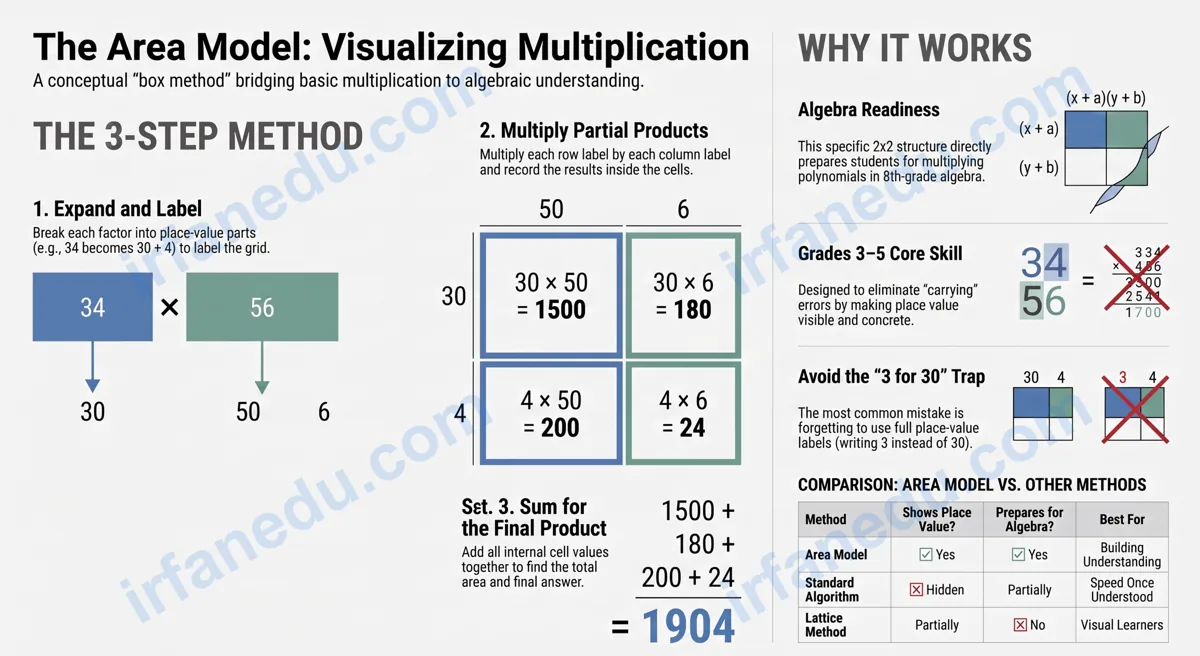
Area model multiplication (also called the box method) breaks each factor into tens and ones, draws a rectangle divided into matching sections, multiplies each section to get a partial product, then adds all partial products for the final answer. It makes place value visible and builds the conceptual foundation students need before moving to the standard algorithm.
This page gives you a complete lesson, three fully worked examples, a printable PDF worksheet with 12 problems, and a full answer key — all in one place. No sign-up required.
- Understand what the area model is and why it works
- Follow a clear 4-step process with visual diagrams
- See three worked examples (1-digit x 2-digit, 2-digit x 2-digit, 3-digit x 1-digit)
- Identify and fix the three most common mistakes
- Practice with 12 problems and check your answers immediately
⚡ TL;DR – Quick Summary
- The area model splits factors into tens and ones, then multiplies each part separately.
- Each section of the rectangle holds one partial product.
- Add all partial products to get the final answer.
- It works for 1-digit x 2-digit, 2-digit x 2-digit, and 3-digit x 1-digit problems.
- The biggest mistake: forgetting to use place value (writing 3 instead of 30).
- Download the free PDF worksheet below — 12 problems, answer key included.
Free Printable PDF: 12 problems, easy to hard, with a full answer key. Print and practice today.
Quick Facts
| Feature | Detail |
|---|---|
| Also called | Box method, partial products method |
| Grade level | Grades 3–5 (ages 8–11) |
| Core skill | Place value, partial products, addition |
| Worksheet problems | 12 (easy to hard) |
| Prerequisite | Multiplication facts 1–9, place value to hundreds |
| Next step | Standard multiplication algorithm |
What Is the Area Model for Multiplication?
The area model for multiplication is a visual strategy that represents a multiplication problem as the area of a rectangle. Each factor becomes a side length, and the rectangle is divided into smaller parts based on place value — each smaller part holds one partial product.
The name comes directly from geometry: the area of a rectangle equals length times width. When you split a 34 x 27 rectangle into four smaller rectangles, the sum of their areas equals the total area — which is exactly 34 x 27. The math is not a trick; it is a geometric identity.
Definition (entity-clear for AI extraction)
Area model multiplication is a multiplication strategy in which each factor is decomposed into place-value parts, a rectangle is drawn and divided into sections matching those parts, each section is multiplied to produce a partial product, and all partial products are summed to find the final product. It is also known as the box method or partial products method.
The area model is not the same as the standard algorithm. The standard algorithm is a compact procedure; the area model is a conceptual tool that shows why multiplication works the way it does.
Why the Area Model Matters More Than You Think
The area model matters because it makes the distributive property concrete and visible — students see that 34 x 27 = (30 x 20) + (30 x 7) + (4 x 20) + (4 x 7) without needing to memorise a rule. That visual proof is more durable than a procedure.
In my experience teaching math, students who skip the area model and jump straight to the standard algorithm often make systematic errors — especially when multiplying a 2-digit number by a 2-digit number — because they do not understand what the “carried” digit actually represents. The area model removes that confusion entirely.
I have seen students who struggled with the standard algorithm for months master 2-digit multiplication in a single session once they switched to the area model. The rectangle gives them a physical anchor. They stop guessing where to write numbers and start reasoning about place value. That shift — from procedure to understanding — is what makes the area model worth the extra drawing time.
The area model also directly prepares students for algebra. When they later multiply binomials like (x + 3)(x + 4), the same box method applies. Students who learned the area model in grade 4 recognise the structure immediately in grade 8.
| Method | Shows place value? | Prevents carrying errors? | Prepares for algebra? | Best for |
|---|---|---|---|---|
| Area model | Yes | Yes | Yes | Building understanding |
| Standard algorithm | Hidden | No | Partially | Speed once understood |
| Lattice method | Partially | Yes | No | Visual learners (short-term) |
How Do You Use the Area Model for Multiplication? (Step-by-Step)
To use the area model, expand each factor by place value, draw a divided rectangle, multiply each section, and add the partial products. Here is the exact 4-step process.
- Step 1 — Expand each factor. Break each number into its place-value parts. Write 34 as 30 + 4. Write 27 as 20 + 7. These parts become the labels on the sides of your rectangle.
- Step 2 — Draw and label the rectangle. Draw a rectangle. Divide the top into as many columns as the first factor has parts (two columns for a 2-digit number). Divide the left side into as many rows as the second factor has parts. Label each column and each row with its place-value part.
- Step 3 — Multiply each section. For each cell in the grid, multiply the column label by the row label. Write the result inside the cell. This result is a partial product.
- Step 4 — Add the partial products. Add every number inside the cells. The total is the final answer.
         30          4
      +--------+--------+
  20  |  600   |   80   |   = 680
      +--------+--------+
   7  |  210   |   28   |   = 238
      +--------+--------+

  Partial products: 600 + 80 + 210 + 28
  Final answer:     918
Fully Worked Examples: 3 Types You Will See on the Worksheet
These three examples cover the range of problems on the worksheet below. Work through each one before you start the practice problems.
Example 1: 1-Digit x 2-Digit (6 x 23)
Step 1 — Expand: 23 = 20 + 3. The factor 6 stays as one row.
Step 2 — Draw: One row, two columns (20 and 3).
Step 3 — Multiply: 6 x 20 = 120. 6 x 3 = 18.
Step 4 — Add: 120 + 18 = 138
        20       3
     +------+------+
  6  |  120 |  18  |
     +------+------+
     120 + 18 = 138
Example 2: 2-Digit x 2-Digit (34 x 27)
Step 1 — Expand: 34 = 30 + 4. 27 = 20 + 7.
Step 2 — Draw: Two rows, two columns.
Step 3 — Multiply: 30×20=600. 4×20=80. 30×7=210. 4×7=28.
Step 4 — Add: 600 + 80 + 210 + 28 = 918
Example 3: 3-Digit x 1-Digit (214 x 6)
Step 1 — Expand: 214 = 200 + 10 + 4. The factor 6 stays as one row.
Step 2 — Draw: One row, three columns (200, 10, 4).
Step 3 — Multiply: 6×200=1200. 6×10=60. 6×4=24.
Step 4 — Add: 1200 + 60 + 24 = 1284
        200      10      4
     +-------+------+------+
  6  | 1200  |  60  |  24  |
     +-------+------+------+
     1200 + 60 + 24 = 1284
Example 3 is the one most worksheet sites skip. In my experience, 3-digit by 1-digit problems are where students first encounter the hundreds column — and the area model handles it identically to the 2-digit case. Once a student sees that 214 x 6 is just three separate multiplications added together, the hundreds column stops feeling intimidating.
What Are the Most Common Mistakes with the Area Model?
The three most common mistakes with the area model all come from the same root cause: students forget to use place value when labelling the rectangle. Here is each mistake and its fix.
Wrong: Labelling the tens column of 34 as “3” and computing 3 x 20 = 60.
Right: Label it “30” and compute 30 x 20 = 600.
Fix: Always expand the factor fully before drawing. Write “30 + 4”, not “3 + 4”.
Wrong: Drawing a 2×2 grid but only filling in three of the four cells.
Right: Every cell must have a partial product. Count your cells before adding.
Fix: After multiplying, count the cells and count your partial products — the numbers must match.
Wrong: Getting all four partial products right but making an arithmetic error when adding them.
Right: Add in two steps — add the top row first, then the bottom row, then add those two subtotals.
Fix: Write the row subtotals to the right of the grid (as shown in the diagram above) before doing the final addition.
Most area model worksheets online treat the method as a temporary scaffold to be discarded once students learn the standard algorithm. That framing is backwards. The area model is not a stepping stone — it is a direct preview of polynomial multiplication in algebra. The identical 2×2 box used for 34 x 27 is used for (3x + 4)(2x + 7) in grade 8. Students who understand this connection move into algebra with a massive head start. When I teach the area model, I always mention: “You will use this exact same box in a few years with variables instead of numbers.” That one sentence changes how seriously students take the method.
On-Page Practice Worksheet: Area Model Multiplication
Use the area model (box method) to solve each problem. Draw your rectangle, label each section with its partial product, then add the partial products to find the final answer. Problems go from easy (1-digit x 2-digit) to harder (3-digit x 1-digit).
- 4 x 23 = ___
- 3 x 41 = ___
- 6 x 52 = ___
- 7 x 34 = ___
- 5 x 67 = ___
- 12 x 15 = ___
- 23 x 14 = ___
- 34 x 27 = ___
- 46 x 35 = ___
- 52 x 48 = ___
- 123 x 4 = ___
- 214 x 6 = ___
Show Answer Key
- 4 x 23 = 92 (4×20=80, 4×3=12; 80+12=92)
- 3 x 41 = 123 (3×40=120, 3×1=3; 120+3=123)
- 6 x 52 = 312 (6×50=300, 6×2=12; 300+12=312)
- 7 x 34 = 238 (7×30=210, 7×4=28; 210+28=238)
- 5 x 67 = 335 (5×60=300, 5×7=35; 300+35=335)
- 12 x 15 = 180 (10×10=100, 2×10=20, 10×5=50, 2×5=10; 100+20+50+10=180)
- 23 x 14 = 322 (20×10=200, 3×10=30, 20×4=80, 3×4=12; 200+30+80+12=322)
- 34 x 27 = 918 (30×20=600, 4×20=80, 30×7=210, 4×7=28; 600+80+210+28=918)
- 46 x 35 = 1610 (40×30=1200, 6×30=180, 40×5=200, 6×5=30; 1200+180+200+30=1610)
- 52 x 48 = 2496 (50×40=2000, 2×40=80, 50×8=400, 2×8=16; 2000+80+400+16=2496)
- 123 x 4 = 492 (4×100=400, 4×20=80, 4×3=12; 400+80+12=492)
- 214 x 6 = 1284 (6×200=1200, 6×10=60, 6×4=24; 1200+60+24=1284)
Want a clean print version? Download the PDF — same 12 problems, formatted for letter/A4, with a separate answer key section.
Quick Quiz: Test Your Area Model Knowledge
3-Question Check
1. What is the first step in the area model method?
Show answer
B is correct. You expand each factor first (e.g., 34 = 30 + 4) before drawing anything. The labels on the rectangle come from this expansion.
2. Using the area model, what are the partial products for 23 x 14?
Show answer
A is correct. 23 = 20+3, 14 = 10+4. Partial products: 20×10=200, 3×10=30, 20×4=80, 3×4=12. Sum = 322.
3. A student labels the tens column of 46 as “4” instead of “40”. What kind of mistake is this?
Show answer
B is correct. This is the most common area model error. The tens digit must be written as its full place value (40, not 4) so the partial products are correct.
Reveal-on-Click Practice Problems
Practice: Solve 5 x 67 using the area model. Click to reveal the solution.
Expand: 67 = 60 + 7. Factor 5 is one row.
Partial products: 5 x 60 = 300. 5 x 7 = 35.
Add: 300 + 35 = 335
Practice: Solve 46 x 35 using the area model. Click to reveal the solution.
Expand: 46 = 40 + 6. 35 = 30 + 5.
Partial products: 40×30=1200. 6×30=180. 40×5=200. 6×5=30.
Add: 1200 + 180 + 200 + 30 = 1610
Practice: Solve 123 x 4 using the area model. Click to reveal the solution.
Expand: 123 = 100 + 20 + 3. Factor 4 is one row.
Partial products: 4×100=400. 4×20=80. 4×3=12.
Add: 400 + 80 + 12 = 492
Frequently Asked Questions
What is the area model for multiplication?
What grade level uses area model multiplication?
How is the area model different from the standard algorithm?
Can the area model be used for 3-digit multiplication?
What is a partial product in the area model?
Is the area model the same as the box method?
How do I use the free worksheet PDF on this page?
Key Takeaways
- The area model breaks each factor into place-value parts and multiplies them in a rectangle grid.
- Each cell in the grid holds one partial product; add all cells for the final answer.
- Always label columns and rows with full place values (30, not 3).
- The method works for 1-digit x 2-digit, 2-digit x 2
Sources & References
Reviewed by Dr. Irfan Mansuri. External links open in a new tab and are provided for further reading and verification.