
Best AI Tools for College Professors: A Complete Guide to Teaching and Research
A practical guide for university faculty, lecturers, assistant professors, associate professors and academic researchers.
Artificial intelligence is changing how college professors prepare lectures, explain complex concepts, evaluate students, conduct literature reviews, analyse data and write research papers. The most effective approach is not to depend on a single AI platform, but to select the right tools for specific academic tasks while maintaining accuracy, academic integrity and human judgement.
1. Why Should College Professors Use AI Tools?
College professors perform several responsibilities beyond classroom teaching. They prepare lesson plans, create presentations, design question papers, mentor students, publish research, write project proposals, analyse experimental results and complete academic documentation.
AI tools can reduce repetitive work and help faculty organise information more efficiently. For example, an AI assistant can generate a first draft of lecture notes, suggest numerical problems, summarise supplied research papers or help write code for analysing experimental data.
With appropriate human review, AI can support professors in:
- Preparing lectures, lesson plans and teaching materials.
- Explaining difficult concepts using examples and analogies.
- Creating quizzes, assignments, rubrics and question banks.
- Finding relevant research papers and identifying research gaps.
- Organising literature reviews and comparing published studies.
- Improving academic language, grammar and manuscript structure.
- Analysing data, writing code and creating scientific graphs.
- Preparing conference presentations and research proposals.
2. Best AI Tools for College Professors for Teaching
Professors can use AI to develop course content, make difficult subjects easier to understand and create learning resources for students from different academic backgrounds.
1. ChatGPT
Best for: Lesson planning and content creation.
Use ChatGPT to draft lecture notes, explain scientific concepts, generate examples, prepare assignments and create practice questions at different difficulty levels.
Example: Prepare 20 Engineering Physics MCQs on lasers, divided into basic, intermediate and advanced levels, with answers and explanations.
2. Google Gemini
Best for: Teaching preparation and Google ecosystem workflows.
Google Gemini can help professors brainstorm teaching activities, simplify explanations, prepare examples and work with supported documents and connected Google services.
Example: Develop a classroom activity explaining semiconductor applications to engineering students.
3. NotebookLM
Best for: Source-based study materials.
NotebookLM helps professors work with supplied sources, such as lecture notes, readings and reference documents, to generate summaries, study guides and source-grounded answers.
Example: Upload a syllabus and approved reading material to prepare a unit-wise revision guide.
4. Canva
Best for: Visual teaching materials.
Canva provides presentation, infographic and visual-design features, including AI-assisted features in supported plans.
Example: Create an infographic showing the applications of fibre optics in computer, mechanical and electronics engineering.
5. Gamma
Best for: Presentation drafts.
Gamma can help transform an outline into a presentation-style document or slide deck. Review equations, diagrams, citations and technical claims before presenting.
Example: Create an initial slide structure for a lecture on quantum mechanics.
6. Diffit
Best for: Adapting learning materials.
Diffit can help educators adapt reading material and create differentiated learning resources, depending on the features available.
Example: Develop an introductory reading passage and comprehension questions for students who need additional support.
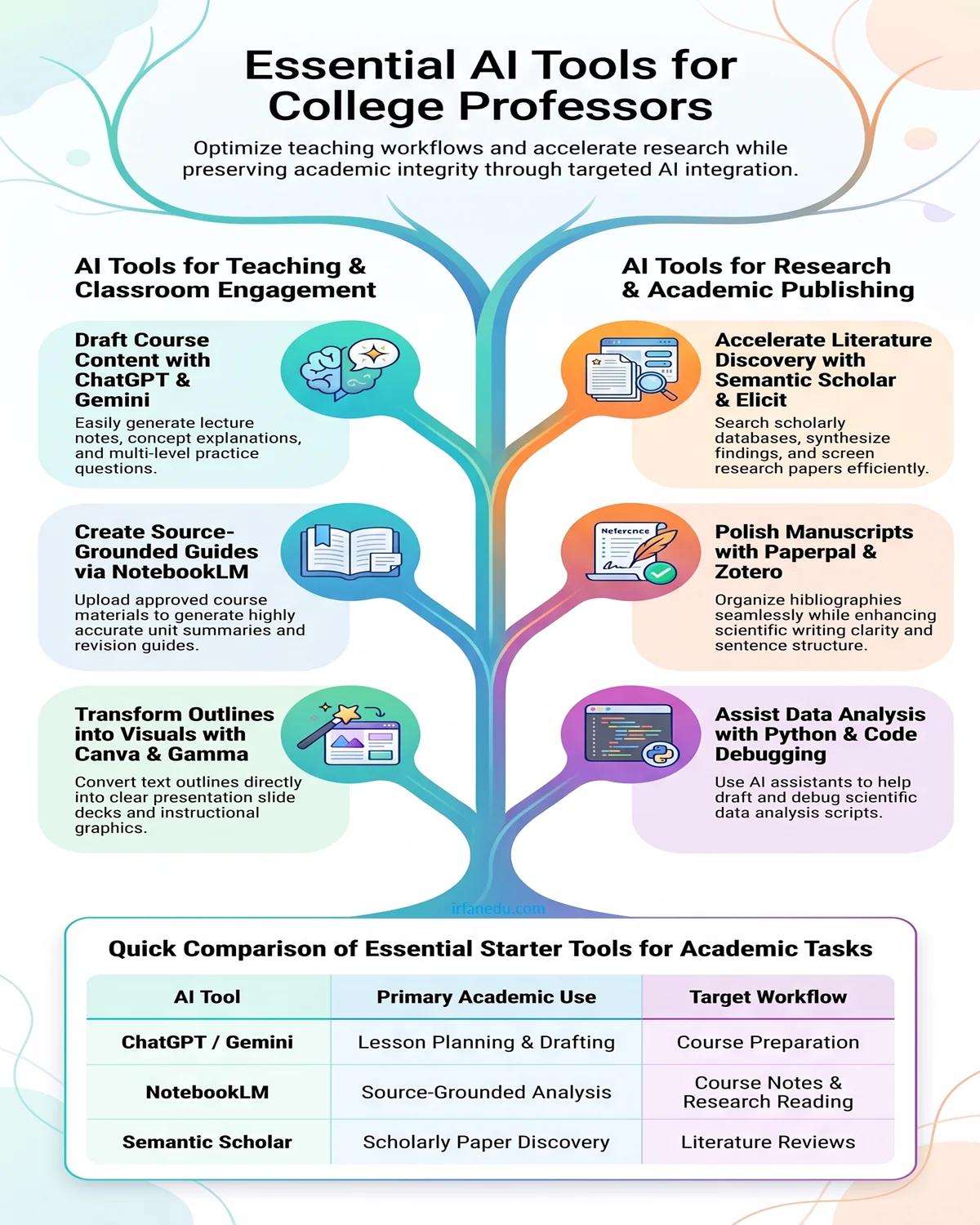
Teaching recommendation: Start with ChatGPT or Gemini for drafting, NotebookLM for working with course sources, and Canva or Gamma when visual presentation is important. You do not need every tool to teach effectively.
3. Best AI Tools for Academic Research
Research requires a different approach from routine content creation. Professors need traceable sources, accurate citations, reproducible methods and a clear distinction between published evidence and AI-generated suggestions.
| AI tool | Primary research use | How professors can use it |
|---|---|---|
| Elicit | Literature reviews | Find relevant papers, screen studies and organise extracted information. |
| Consensus | Evidence-based questions | Explore what scientific studies report about a research question. |
| Semantic Scholar | Scholarly discovery | Discover research papers, authors and related studies. |
| Scite | Citation context | Investigate how later publications cite a particular paper, including supporting or contrasting contexts. |
| ResearchRabbit | Research mapping | Explore connections between papers, authors and related research topics. |
| Perplexity | Exploratory web research | Investigate emerging topics and locate web sources for further verification. |
| NotebookLM | Reading research documents | Compare and question a supplied collection of papers and notes using source-grounded answers. |
| ChatGPT | Research assistance | Develop research questions, analyse supplied data, write code and organise draft sections. |
How to use AI during a literature review
- Define the research question. Write a focused question, identify the research variables and establish the scope of the review.
- Discover relevant papers. Use scholarly search tools, academic databases and discipline-specific sources to find candidate studies.
- Screen the evidence. Apply documented inclusion and exclusion criteria. AI can assist with screening, but the researcher must validate decisions.
- Extract and compare findings. Organise information about methods, samples, measurements, results and limitations in a structured table.
- Verify citations and conclusions. Open the original papers and confirm that each cited source supports the relevant claim.
- Write the synthesis. Explain agreements, disagreements, limitations and research gaps using evidence from the verified studies.
4. AI Tools for Academic Writing and Research Publications
Academic writing tools are most useful when they improve clarity without changing the meaning of scientific results or introducing unsupported claims.
Grammarly
Grammarly assists with grammar, spelling, clarity and writing style. Professors can use it when revising manuscripts, lecture notes, formal emails and research proposals.
Paperpal
Paperpal offers academic-focused writing assistance for researchers who need help refining manuscript language and preparing scholarly documents.
Zotero
Zotero is a reference-management tool rather than a general-purpose generative AI assistant. It is valuable for collecting papers, organising sources and managing citations and bibliographies.
How to use these tools effectively
- Improve sentence clarity while preserving the original meaning.
- Standardise terminology throughout a manuscript.
- Organise references and check citation formatting.
- Improve the structure of an abstract, introduction or discussion.
- Review grammar before submitting to a journal or conference.
Never allow a writing assistant to invent experimental results, fabricate references or overstate the significance of a finding. Always check the journal’s AI-use and disclosure policies.
5. AI Tools for Student Assessment and Engagement
Professors can use AI to prepare formative assessments, practise question generation and provide more structured feedback. The final assessment must remain aligned with the syllabus, learning outcomes and institutional examination rules.
| Tool | Academic application |
|---|---|
| Wayground (formerly Quizizz) | Interactive quizzes, classroom practice and formative assessment using available features. |
| Kahoot! | Live classroom quizzes and student participation. |
| Google Forms | Online quizzes, feedback collection and basic assessment workflows. |
| ChatGPT | Drafting question banks, rubrics, model solutions and feedback templates. |
For example, a professor teaching Engineering Physics can generate practice questions on superconductivity, ask for separate conceptual and numerical sections, and prepare explanations for incorrect options. The professor should independently solve numerical problems and verify every answer before distribution.
AI-generated grading should not be the sole basis for high-stakes examination decisions. Human review, transparent rubrics, accessibility and student privacy remain essential.
6. A Practical AI Workflow for a College Professor
Instead of learning ten platforms simultaneously, begin with a small set of tools and integrate them into regular academic work.
Before the lecture
Use ChatGPT or Gemini to draft learning objectives, examples, discussion questions and a lesson outline.
During course preparation
Use NotebookLM to consult approved course documents and Canva or Gamma to develop visual materials.
During research
Use Semantic Scholar to discover papers, Elicit to assist with literature reviews and Zotero to organise references.
During data analysis
Use Python with NumPy, pandas, SciPy and Matplotlib for numerical analysis, statistics and scientific plots. An AI assistant can help draft and debug code.
Before publication
Use a writing assistant to improve language, Zotero to manage citations and original sources to verify claims.
For student feedback
Prepare formative quizzes, rubrics and feedback drafts. Review assessment content before sharing it with students.
Example: Research workflow for a Physics professor
Suppose a professor is studying the electrical and magnetic properties of perovskite manganites. A practical workflow could be:
- Use Semantic Scholar and relevant scholarly databases to discover papers on the material and its properties.
- Use Elicit to help organise the literature and compare reported experimental methods and findings.
- Read the original papers and record verified experimental parameters, reported results and limitations.
- Use Python and suitable scientific libraries to analyse the professor’s own experimental dataset.
- Ask an AI assistant to help debug code or suggest ways to visualise resistivity, temperature or magnetic measurements.
- Draft the manuscript using verified results, original references and the journal’s submission requirements.
This workflow combines AI assistance with established scientific methods. AI does not validate measurements, establish causation or replace peer review.
7. Responsible and Ethical Use of AI in Academia
Professors should establish clear boundaries for AI use in teaching and research. These practices help protect students, preserve research integrity and reduce avoidable errors.
- Verify facts and references: Check original papers, DOI records, equations, numerical results and quotations.
- Protect confidential information: Do not upload unpublished manuscripts, examination papers, identifiable student records or sensitive research data to an AI service unless its terms and institutional policies permit it.
- Follow publication policies: Review the target journal’s requirements for declaring AI assistance. Authors remain responsible for the manuscript.
- Preserve academic integrity: Do not present generated text, analysis or references as verified original research without appropriate review and disclosure.
- Maintain human oversight: Review generated teaching materials, grades, research interpretations and student-facing recommendations.
- Check institutional rules: Follow university policies, research ethics requirements, copyright restrictions and applicable data-protection obligations.
8. Best AI Tools for Professors on a Limited Budget
Professors do not need to purchase every premium subscription. A practical starting setup can combine free or institutionally available services with specialist tools only when required. Free tiers, feature limits and institutional licences may change.
| Need | Starting option | Reason |
|---|---|---|
| Teaching preparation | ChatGPT or Gemini | Draft explanations, examples and lesson outlines. |
| Reading course material | NotebookLM | Work with a selected collection of source documents. |
| Research paper discovery | Semantic Scholar | Search scholarly literature and explore related work. |
| Reference management | Zotero | Organise citations and bibliographies. |
| Scientific data analysis | Python ecosystem | Use NumPy, pandas, SciPy and Matplotlib where appropriate. |
| Visual teaching materials | Canva | Prepare infographics and presentation assets. |
Before paying for a tool, check whether your university already provides a licence, whether your existing software can perform the task and whether the tool supports your subject’s requirements.
9. Final Recommendations: Which AI Tools Should a Professor Learn First?
For most college professors, a compact and well-integrated AI toolkit is more useful than subscribing to many overlapping services.
- ChatGPT or Gemini: Start with lesson planning, explanations, brainstorming and drafting.
- NotebookLM: Learn to work with your own course documents and research sources.
- Semantic Scholar: Build an efficient scholarly paper-discovery workflow.
- Elicit: Add structured literature-review assistance when your research requires it.
- Zotero: Maintain a reliable reference library and consistent citation workflow.
- Python tools: Use scientific computing and data visualisation for quantitative research.
The best AI tool for a professor ultimately depends on the discipline, teaching responsibilities, research methodology, available budget and institutional policies. Begin with one teaching assistant and one research workflow, measure the time saved, and expand only when a clear academic need arises.
10. Frequently Asked Questions
Which AI tool is best for college professors?
ChatGPT and Gemini are useful general-purpose starting points for teaching preparation. NotebookLM is useful for working with supplied documents, while Elicit and Semantic Scholar support different stages of academic literature discovery and review. The best choice depends on the task.
Which AI tools are best for academic research?
Semantic Scholar supports paper discovery, Elicit helps organise literature reviews, Consensus explores questions against scientific literature, Scite provides citation context, and NotebookLM supports analysis of supplied sources. These tools complement rather than replace scholarly databases and original papers.
Can professors use AI to write research papers?
AI can assist with outlines, language editing, code, data organisation and draft development. Researchers must verify every claim, retain responsibility for the work and comply with journal, institutional and funder disclosure policies.
Can AI tools replace Google Scholar or academic databases?
No. AI tools can help discover and interpret literature, but they do not guarantee comprehensive coverage or accurate citations. Professors should use appropriate scholarly databases, inspect original publications and document search methods when required.
Can AI generate question papers and MCQs?
Yes. AI can draft MCQs, numerical problems, answer keys, explanations and assessment rubrics. Professors should verify correctness, difficulty, syllabus alignment, ambiguity and fairness before using the material in an examination.
Which AI tools help with literature reviews?
Elicit can assist with paper discovery, screening and structured extraction. Semantic Scholar helps discover scholarly work, ResearchRabbit maps related literature, and Scite helps examine citation context. A rigorous review still requires a documented search and human verification.
Are free AI tools sufficient for university professors?
Free or institutionally provided tools are often sufficient for basic lesson planning, paper discovery, reference management and initial document analysis. Paid tools may be worthwhile when their additional capabilities address a specific research or teaching need.
Is it safe to upload research papers and student data to AI?
Safety depends on the service, its data handling terms, institutional agreements and the type of information. Avoid uploading confidential or identifiable data unless the service is approved for that use and applicable policies permit it.
How can a Physics professor use AI for research?
A Physics professor can use AI to explore literature, compare research methods, draft Python code, debug numerical analysis, prepare scientific graphs and improve manuscript language. Equations, measurements, physical interpretations and references must be independently verified.