
⏱️ SAT Timer: Master Every Section’s Time Limits (2026 Guide)
📋 Table of Contents
- 🧠 Quick Self-Test: Can You Beat the Clock?
- ⚡ Quick Answer
- What Is the SAT Timer and How Does It Work?
- Digital SAT Time Limits: Section-by-Section Breakdown
- How Many Seconds Per Question Do You Actually Get?
- How to Use the SAT Timer Effectively (Step-by-Step)
- The Checkpoint Method: Your Internal Pacing System
- Common SAT Timing Mistakes (and How to Fix Them)
- SAT Extended Time and Accommodations
- 💡 Unique Insight: The Mistake Most Guides Miss
- 🧪 Quick Quiz
- Practice Problems
- FAQ
- Sources & References
🧠 Quick Self-Test: Can You Beat the Clock?
Before you read on, answer this: You have 32 minutes and 27 questions in a Reading and Writing module. You’ve finished question 18 and your timer shows 14 minutes left. Are you on pace, ahead, or behind?
👆 Tap to reveal the answer
Time is the invisible enemy on the SAT. Most students who miss their score goal don’t fail because they don’t know the material — they fail because they run out of clock. In my 15+ years of working with SAT students, I’ve seen a 1400-capable student score 1180 simply because they spent 4 minutes on one Reading question and never recovered.
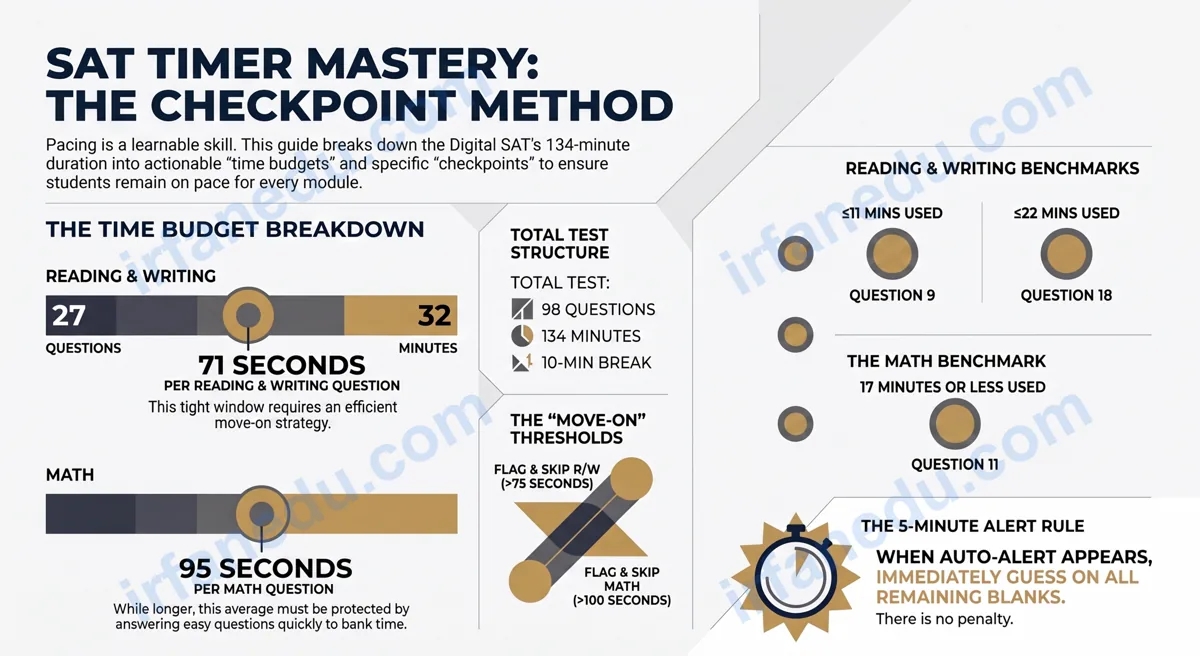
The digital SAT gives you 134 minutes of total testing time split across four modules: two Reading and Writing modules (32 minutes, 27 questions each) and two Math modules (35 minutes, 22 questions each). That works out to roughly 71 seconds per Reading/Writing question and 95 seconds per Math question. Knowing these numbers — and building a pacing strategy around them — is the single highest-leverage thing you can do before test day.
- 🕐 Understand exactly how the Bluebook timer works
- 📊 Know the per-question time budget for every module
- 🗺️ Build a checkpoint-based pacing system
- 🚫 Avoid the 5 timing mistakes that cost students the most points
- ♿ Know your rights if you qualify for extended time
The digital SAT gives you 64 minutes for Reading and Writing (two 32-minute modules, 27 questions each) and 70 minutes for Math (two 35-minute modules, 22 questions each). That is roughly 71 seconds per Reading/Writing question and 95 seconds per Math question. The Bluebook app shows a built-in countdown timer and alerts you when 5 minutes remain in any module.
⚡ TL;DR – Quick Summary
- 🕐 Each R/W module: 32 min, 27 questions (~71 sec/question)
- 📐 Each Math module: 35 min, 22 questions (~95 sec/question)
- 💻 Bluebook app has a built-in timer; it auto-alerts at 5 min remaining
- 🚩 Flag and skip any question eating more than 90 seconds
- ✅ Never leave a blank — no wrong-answer penalty on the digital SAT
- 🏁 Use the Checkpoint Method: check your pace at question 9 (R/W) and question 11 (Math)
🖥️ What Is the SAT Timer and How Does It Work?
The SAT timer is a built-in countdown clock inside the College Board’s Bluebook testing app. It sits in the top-right corner of your screen and counts down from the full module time the moment you begin each section.
Unlike the old paper SAT — where a proctor announced time verbally and you had to glance at a wall clock — the digital SAT gives every student a personal, always-visible countdown. This is actually a significant advantage if you know how to use it. Here is what the Bluebook timer does:
- Counts down continuously from the module’s full time limit
- Can be hidden if you find it distracting (click the eye icon)
- Reappears automatically when 5 minutes remain — you cannot hide this final alert
- Locks the module the instant time expires; you cannot submit or change answers after that
- Does NOT carry over unused time from one module to the next
📊 Digital SAT Time Limits: Section-by-Section Breakdown
The digital SAT is organized into two main sections — Reading and Writing, then Math — each split into two adaptive modules. Here is the complete breakdown.
| Module | Questions | Time Allowed | Seconds/Question | Adaptive? |
|---|---|---|---|---|
| Reading & Writing — Module 1 | 27 | 32 min | ~71 sec | Standard (all students) |
| Reading & Writing — Module 2 | 27 | 32 min | ~71 sec | Yes (harder or easier based on M1) |
| Math — Module 1 | 22 | 35 min | ~95 sec | Standard (all students) |
| Math — Module 2 | 22 | 35 min | ~95 sec | Yes (harder or easier based on M1) |
| Total Testing Time | 98 | 134 min | — | — |
There is also a mandatory 10-minute break between the Reading/Writing section and the Math section. That break does not count toward your testing time, but use it wisely — stretch, eat a snack, and reset mentally.
⏳ How Many Seconds Per Question Do You Actually Get?
Your per-question time budget is the most important number to internalize before test day. Most students have never calculated it — and that’s a costly oversight.
| Section | Total Time | Questions | Budget/Question | Practical Rule |
|---|---|---|---|---|
| Reading & Writing | 32 min (1,920 sec) | 27 | 71 sec | Move on after 75 sec |
| Math | 35 min (2,100 sec) | 22 | 95 sec | Move on after 100 sec |
The 71-second Reading/Writing budget feels tight at first. But remember: the first 15-18 questions in each module are shorter, single-passage items that most students can answer in 45-60 seconds. That builds a buffer for the longer, harder questions near the end.
Every guide tells students they have 95 seconds per Math question, and students hear that as “I have plenty of time.” They don’t. In my experience, the hardest 4-5 questions in Math Module 2 (the hard adaptive path) can easily eat 3-4 minutes each if you let them. The 95-second average only works if you spend 60-70 seconds on the easy questions, banking time for the hard ones. Students who treat 95 seconds as a per-question ceiling — rather than an average — consistently run out of time on the back half of the module.
🗺️ How to Use the SAT Timer Effectively (Step-by-Step)
Using the SAT timer well is a skill you build through deliberate practice, not something that happens automatically on test day. Here is the exact process I teach my students.
-
Memorize your budgets before you sit down. Know that R/W = ~71 sec/question and Math = ~95 sec/question. Write them on your scratch paper the moment the module begins.
-
Keep the timer visible for the first 5-10 practice tests. You need to calibrate your internal clock. Only hide it once you can estimate elapsed time accurately without looking.
-
Set internal checkpoints (see the next section). Check the timer at question 9 in R/W and question 11 in Math.
-
Flag and skip any question that exceeds your move-on threshold (75 sec for R/W, 100 sec for Math). Use Bluebook’s built-in flag feature — it marks the question for review without losing your place.
-
At the 5-minute alert, stop attempting new hard questions. Immediately fill in your best guess for every flagged/unanswered item. A guess has a 25% chance of being right; a blank has 0%.
-
Use remaining time to review flagged questions — not to second-guess questions you already answered confidently.
📐 Visual: SAT Module Timeline (Reading & Writing, 32 min)
  0 min ──────────────────────────────────────── 32 min
  |                                              |
  |  Q1–Q9        Q10–Q18       Q19–Q27          |
  |  (Easy–Med)   (Med–Hard)    (Hard)            |
  |  ~10.5 min    ~10.5 min     ~11 min           |
  |                                              |
  ▼ CHECKPOINT 1  ▼ CHECKPOINT 2  ▼ 5-MIN ALERT  |
  @ Q9: ≤11 min   @ Q18: ≤22 min  @ 27 min mark  |
  used            used            GUESS ALL BLANKS|
  |______________________________________________|

  MATH MODULE (35 min, 22 questions):
  0 min ──────────────────────────────────────── 35 min
  |  Q1–Q11       Q12–Q22                        |
  |  (Easy–Med)   (Med–Hard)                     |
  |  ~17 min      ~18 min                        |
  ▼ CHECKPOINT    ▼ 5-MIN ALERT                  |
  @ Q11: ≤17 min  @ 30 min mark                  |
  used            GUESS ALL BLANKS               |
  |______________________________________________|
🏁 The Checkpoint Method: Your Internal Pacing System
The Checkpoint Method is the most reliable SAT timing strategy I’ve found after testing dozens of approaches with students. It replaces vague “try to go faster” advice with concrete, measurable targets you can hit in real time.
The idea is simple: at two specific question numbers in each module, you glance at the timer and compare your elapsed time to a target. If you’re over the target, you know to speed up immediately — not at the end of the module when it’s too late.
| Module | Checkpoint Question | Time Elapsed Should Be ≤ | If Over Target: Action |
|---|---|---|---|
| Reading & Writing | Question 9 | 11 minutes | Skip next hard question immediately |
| Reading & Writing | Question 18 | 22 minutes | Flag and skip; guess on any blank |
| Math | Question 11 | 17 minutes | Skip next hard question immediately |
Some coaches tell students to track a “questions per minute” rate continuously. In my experience, that creates cognitive overload — you’re doing mental math while also trying to read a passage. Checkpoints are binary: you either hit the target or you didn’t. That simplicity is what makes them work under test-day stress. I’ve seen students improve their pacing consistency dramatically just by using two checkpoint checks per module instead of constant monitoring.
🚫 Common SAT Timing Mistakes (and How to Fix Them)
These are the five timing mistakes I see most often — and each one has a specific, actionable fix.
Fix: Set a hard move-on rule. 75 seconds for R/W, 100 seconds for Math. Flag it, guess, move on. You can return later.
Fix: At the 5-minute alert, immediately fill in a letter (B or C statistically appear slightly more often, though any guess is fine) for every blank. Never leave a question empty.
Fix: On R/W, read the passage once, annotate the main idea, then answer all questions tied to that passage before moving on.
Fix: Only change an answer if you have a specific, concrete reason (e.g., you misread a word). Research consistently shows first instincts are more often correct on standardized tests.
Fix: Every practice session should be timed. Untimed practice builds content knowledge but not pacing skill — and pacing is a separate, trainable skill.
♿ SAT Extended Time and Accommodations: What You Need to Know
Students with documented disabilities may qualify for extended time on the SAT through the College Board’s Services for Students with Disabilities (SSD) program. This is a legitimate, widely-used accommodation — not a loophole.
| Accommodation Type | Time Multiplier | R/W Module Time | Math Module Time |
|---|---|---|---|
| Standard (no accommodation) | 1× | 32 min | 35 min |
| Time and a half (50% extended) | 1.5× | 48 min | 52.5 min |
| Double time (100% extended) | 2× | 64 min | 70 min |
To apply, your school’s SSD coordinator submits documentation to the College Board. The process typically takes 7 weeks, so apply well before your test date. Accommodations must be approved before registration — you cannot request them on test day.
💡 Unique Insight: What Most SAT Timer Guides Get Wrong
Almost every guide tells you to “pace yourself” and “don’t spend too long on one question.” That’s true but incomplete — and missing the deeper point costs students real points. Here’s what I’ve found after analyzing hundreds of student practice tests: the biggest timing problem isn’t slow students, it’s students who are fast on easy questions and then catastrophically slow on hard ones. They finish the first 15 questions in 12 minutes (great!), then hit a hard inference question and spend 5 minutes on it, destroying their buffer. The fix isn’t to go faster overall — it’s to set an asymmetric time cap: spend LESS time than average on easy questions (aim for 50-55 sec on R/W questions 1-15) so you have a genuine surplus for the hard questions at the end. No other guide I’ve seen frames it this way, but it’s the insight that consistently unlocks the last 20-30 points for my students.
🧪 Quick Quiz: Test Your SAT Timer Knowledge
Q1. How many seconds per question do you have in a Reading and Writing module?
💜 Answer: B — 32 minutes ÷ 27 questions = ~71 seconds per question.
Q2. What happens to the Bluebook timer when you hide it?
💜 Answer: C — The 5-minute alert cannot be hidden. It reappears automatically.
Q3. You’re on Math question 11 and 20 minutes have elapsed. What should you do?
💜 Answer: B — At Q11, you should have used ≤17 minutes. At 20 minutes, you’re 3 minutes behind. Flag and skip the next time-sink question.
🔬 Practice Problems: Apply the Checkpoint Method
Problem 1: Are You On Pace? (R/W Module)
Scenario: You’re in Reading and Writing Module 1. You’ve just finished question 14 and your timer shows 18 minutes elapsed. Are you on pace?
Solution: At question 14 of 27, you’ve completed 52% of the questions and used 56% of your time (18 of 32 minutes). Ideal: 14 × 71 sec = 994 sec = ~16.6 minutes. You’ve used 18 minutes — about 1.4 minutes over budget. You’re slightly behind. Flag the next question that feels hard and skip it immediately to recover your buffer.
Problem 2: The 5-Minute Scramble (Math Module)
Scenario: The 5-minute alert just appeared in Math Module 2. You have questions 19, 20, 21, and 22 unanswered. What’s your optimal move?
Solution: With 5 minutes and 4 questions, you have ~75 seconds per question. Quickly scan each: if any looks solvable in under 60 seconds, do it. For the rest, fill in your best guess immediately — don’t leave blanks. There is no wrong-answer penalty, so a guess gives you a 25% chance of a correct answer. A blank gives you 0%.
Problem 3: Building Your Time Buffer (R/W)
Scenario: You want to build a 3-minute buffer for the hard questions at the end of an R/W module. How fast do you need to answer the first 15 questions?
Solution: Total time = 32 min. Hard questions (Q16–Q27 = 12 questions) should get ~71 sec each = ~14.2 min. Buffer = 3 min. So Q1–Q15 must be done in 32 – 14.2 – 3 = 14.8 minutes. That’s 14.8 min ÷ 15 questions = ~59 seconds per question for the first 15. Totally achievable on easier questions — and it gives you a meaningful buffer for the hard ones.
❓ Frequently Asked Questions About the SAT Timer
How long is each section on the digital SAT?
How many seconds per question does the SAT allow?
Does the digital SAT have a built-in timer?
Can I use my own timer on the SAT?
What is the best SAT timing strategy?
What happens if I run out of time on the SAT?
Sources & References
Reviewed by Dr. Irfan Mansuri. External links open in a new tab and are provided for further reading and verification.