
Most framing mistakes — a photo that falls through, a mat that covers too much, a frame that arrives too small — trace back to one misunderstood measurement. This calculator fixes that in seconds.
Frame Image Size Calculator: Get the Perfect Fit Every Time
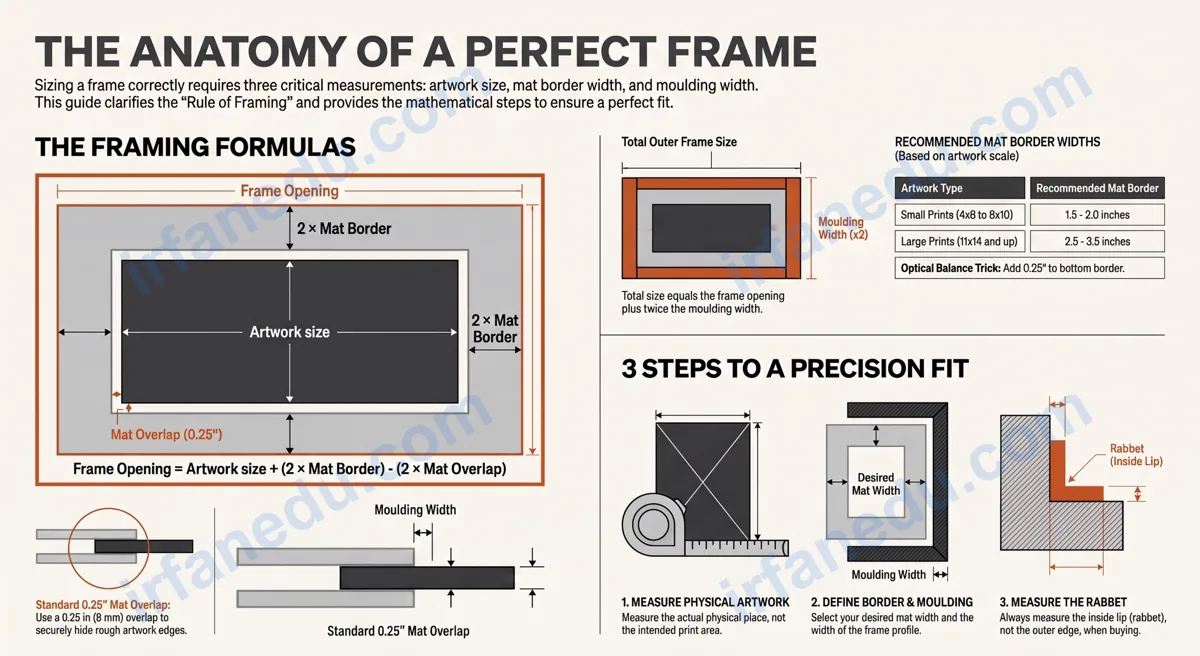
This free Frame Image Size Calculator tells you the exact frame opening size, mat board dimensions, and outer frame size for any photo or artwork. Enter your artwork dimensions, mat border width, and moulding width — and get the answer instantly, with a numbered step-by-step solution.
To size a picture frame correctly, you need three measurements: the artwork size, the mat border width, and the frame moulding width. The frame opening equals the artwork size plus twice the mat border, minus twice the mat overlap. The outer frame size equals the frame opening plus twice the moulding width.
The frame opening size equals your artwork dimensions plus twice the mat border width, minus twice the mat overlap (usually 0.25 in). The outer frame size equals the frame opening plus twice the moulding width. For a 5×7 photo with a 2 in mat border and 1 in moulding, the frame opening is 8.5×10.5 in and the outer frame is 10.5×12.5 in.
⚡ TL;DR – Quick Summary
- Frame opening = artwork size + (2 × mat border) − (2 × mat overlap).
- Outer frame size = frame opening + (2 × moulding width).
- Mat board size = frame opening + (2 × mat overlap) for a snug fit.
- Standard mat overlap is 0.25 in; standard mat border is 2–3 in for photos.
- Always measure the rabbet (inside lip), not the outer edge, when buying a frame.
- Use this calculator before ordering — a wrong frame size is a costly mistake.
| Measurement | Typical Value | Notes |
|---|---|---|
| Mat overlap | 0.25 in (6 mm) | Hides rough artwork edges |
| Mat border (small prints) | 1.5–2 in | 4×6 to 8×10 photos |
| Mat border (large prints) | 2.5–3.5 in | 11×14 and larger |
| Moulding width (standard) | 0.75–1.5 in | Varies by frame style |
| Bottom mat border (weighted) | +0.25–0.5 in extra | Optical balance trick |
Frame Image Size Calculator
Find frame opening, mat board & outer frame dimensions instantly
in
in
in
in
in
in
in
in
in
in
Your Frame Measurements
Step-by-Step Solution
How to Use This Frame Image Size Calculator
Follow these steps to get your frame measurements in under a minute:
- Choose your unit — inches, centimeters, or millimeters.
- Select a mode — “With Mat” if you are using a mat board, or “No Mat” for a direct-fit frame.
- Enter artwork width and height — measure the physical artwork, not the print area.
- Enter mat border width — the gap you want between the artwork edge and the frame opening (typically 2 in for standard photos).
- Enter mat overlap — how much the mat covers the artwork edge (standard: 0.25 in). Leave as 0 if unsure, then adjust.
- Enter moulding width — the width of the frame profile itself (measure from the outer edge to the rabbet).
- Click Calculate — the result card shows the frame opening, mat board cut size, and outer frame size with a full step-by-step breakdown.
What Is Frame Image Size?
Frame image size refers to the set of three related measurements that define how a piece of artwork fits inside a frame: the frame opening (rabbet size), the mat board dimensions, and the outer frame size. Understanding all three prevents the most common framing errors.
The frame opening is the hole inside the frame through which the artwork is visible. It is always slightly smaller than the mat board (because the mat overlaps the artwork edge) and smaller than the outer frame (because the moulding adds width on all sides).
Visual: Frame Layer Diagram (cross-section, top view)
+-----------------------------------------------Sources & References
Written and fact-checked by Dr Irfan Mansuri. External links open in a new tab and are provided for further reading and verification.